Gaming lounges — PlayStation rooms, starting in Egypt
PlayDesk
A system in Arabic that runs a PlayStation lounge from one screen: every room, session, drink, payment and daily close, on any device, for as many lounges as you like.
- System type
- Management system for many separate lounges: front desk, money, inventory, reports and an operator console, on desktop, tablet and phone
- Our role
- Full build — working out how a lounge really runs its day first, then building and checking it screen by screen
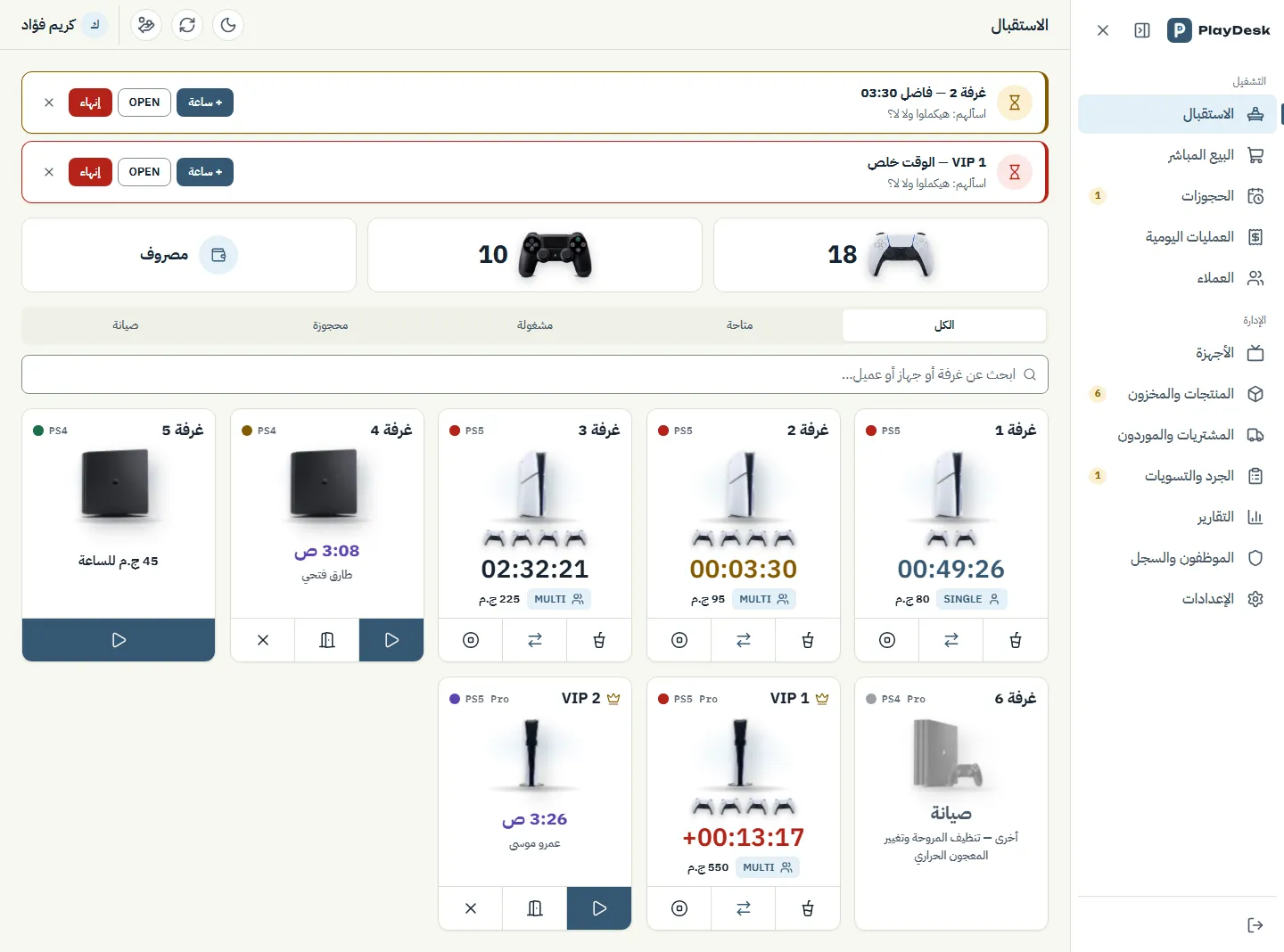
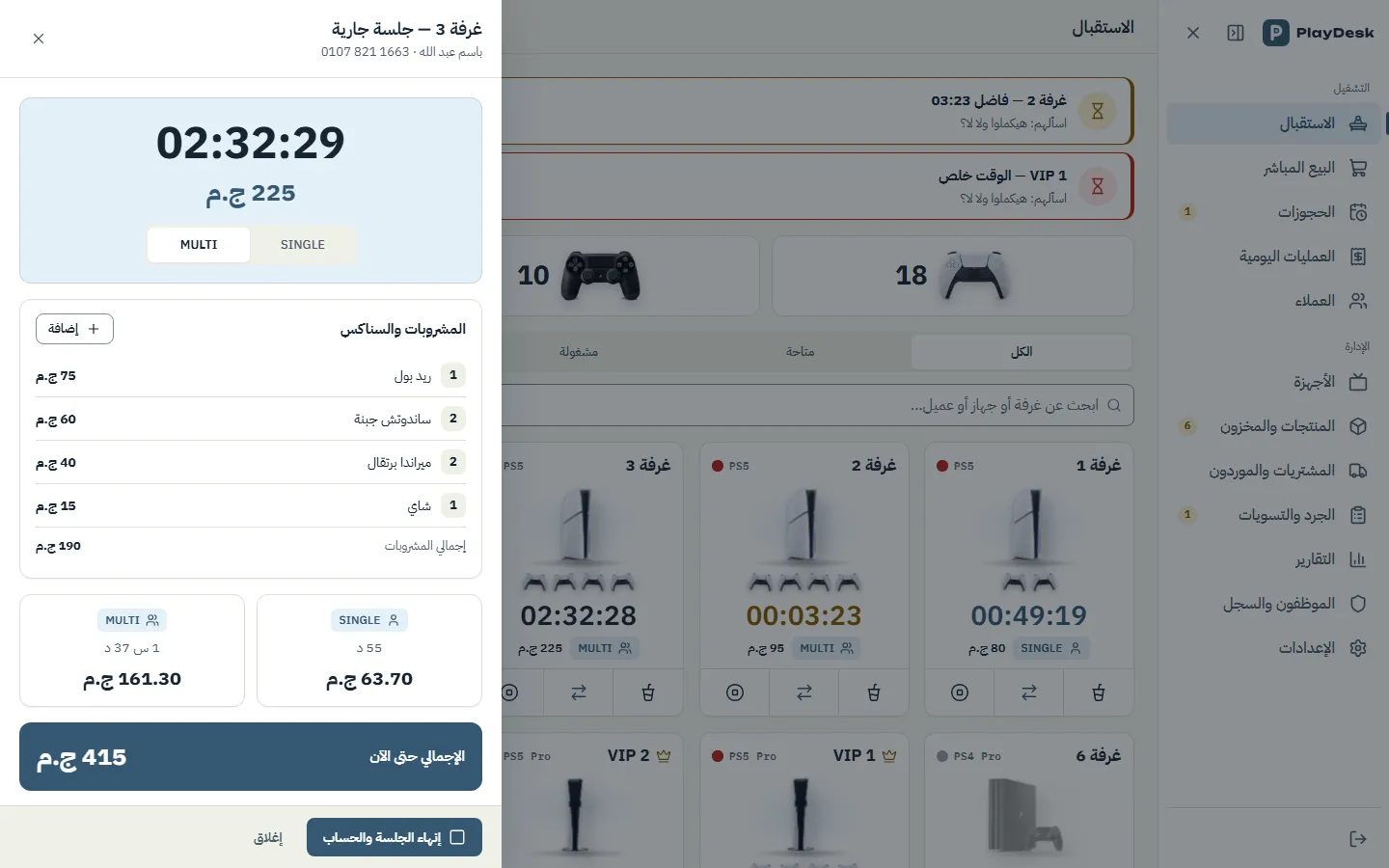
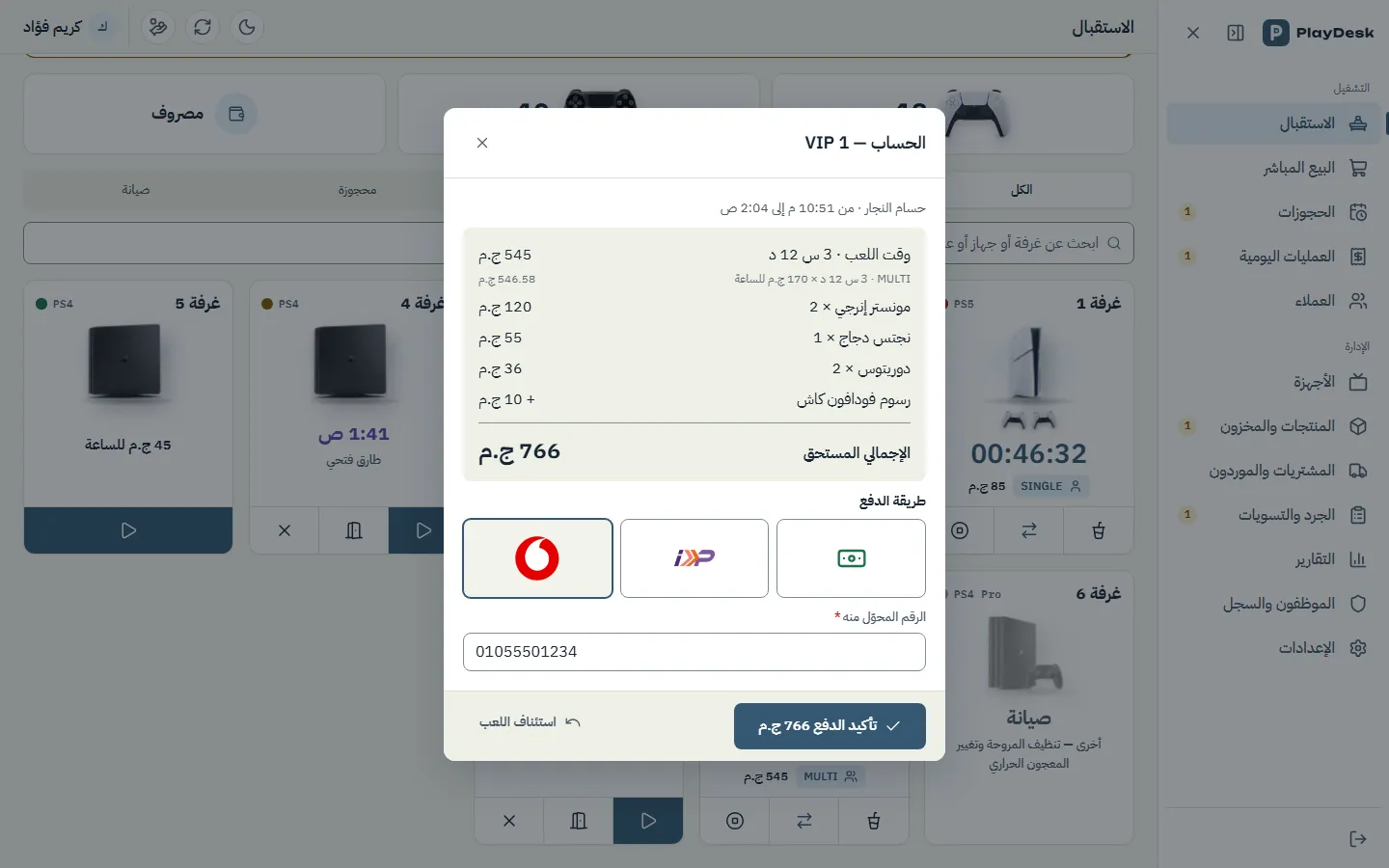
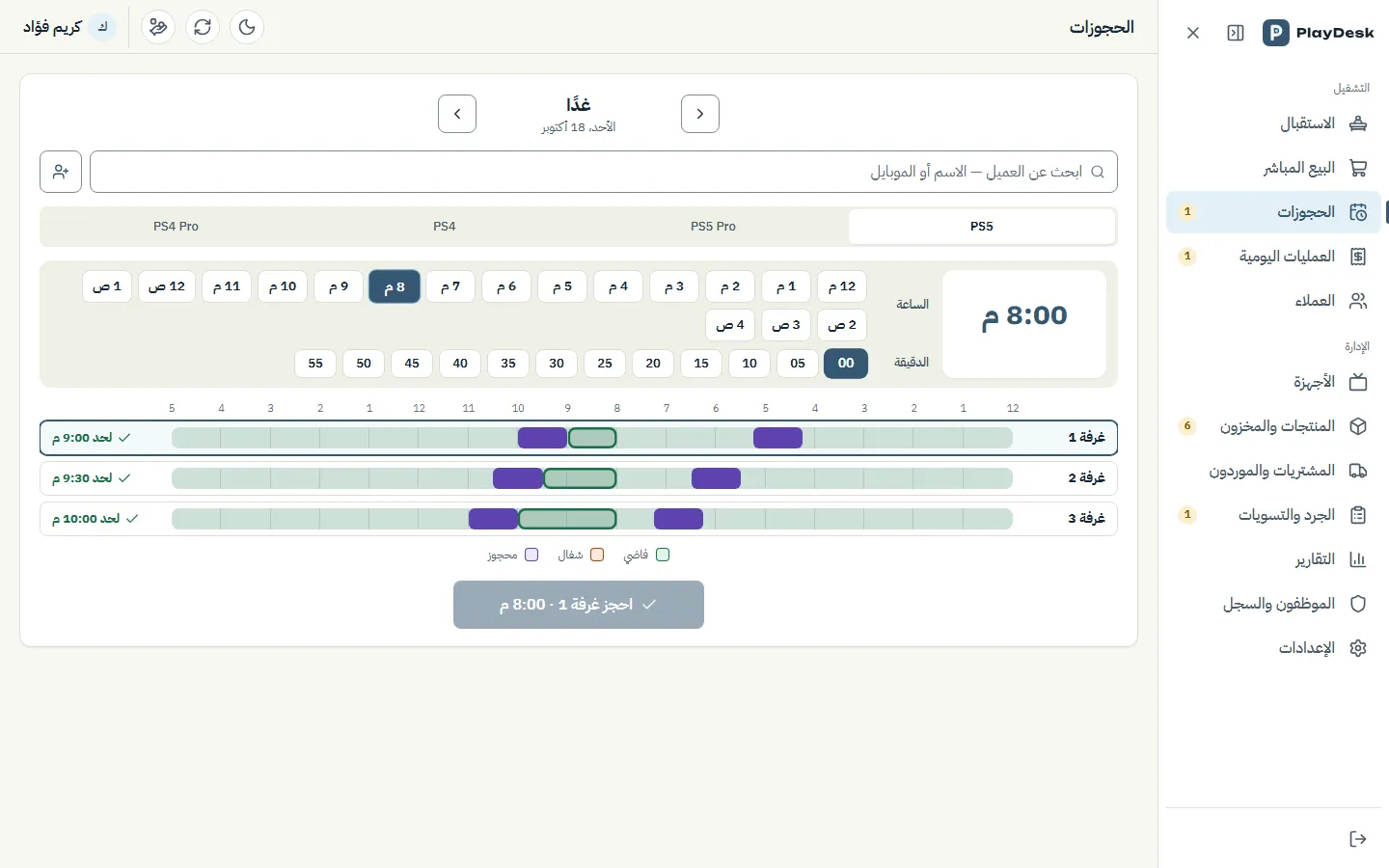
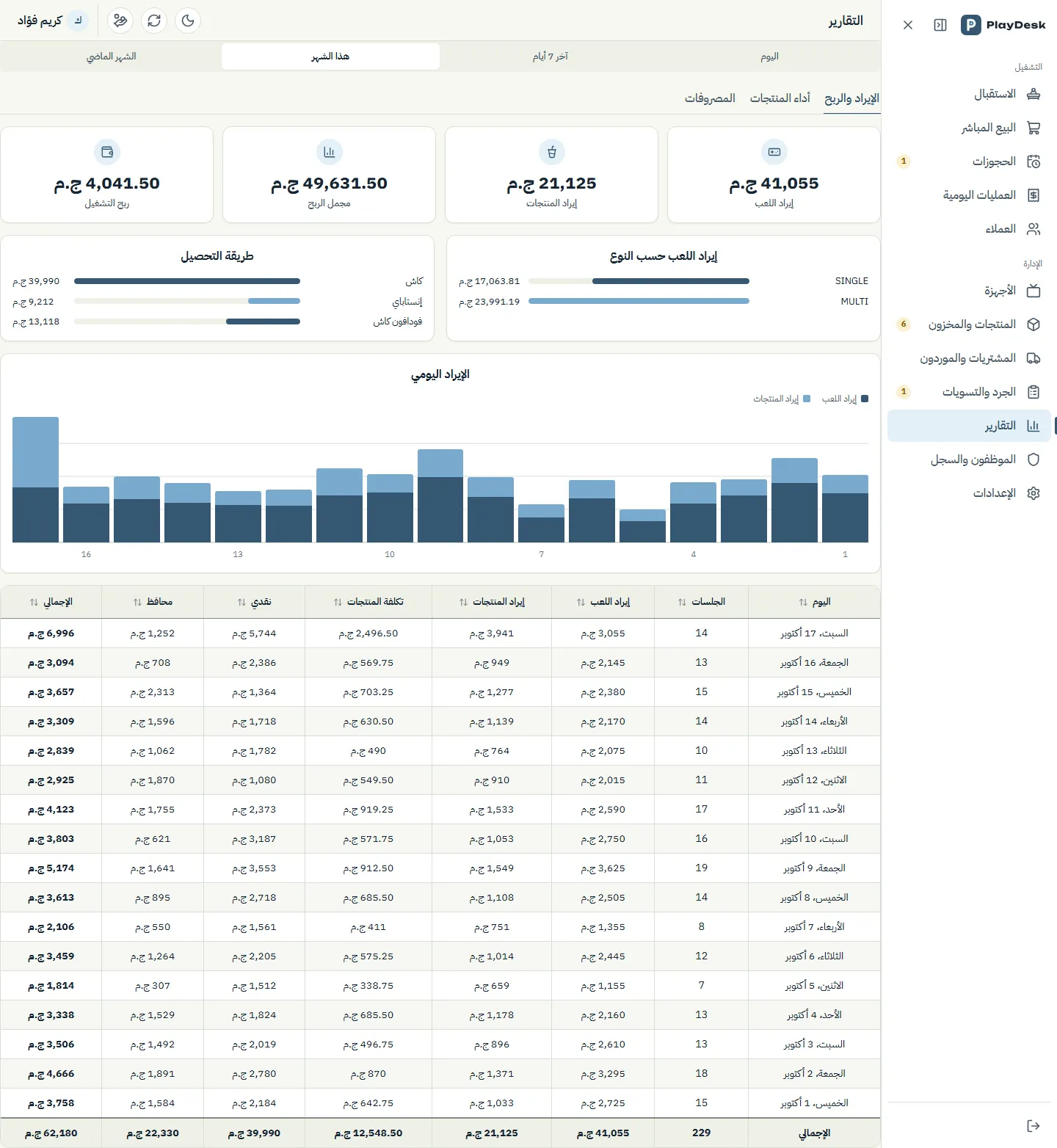
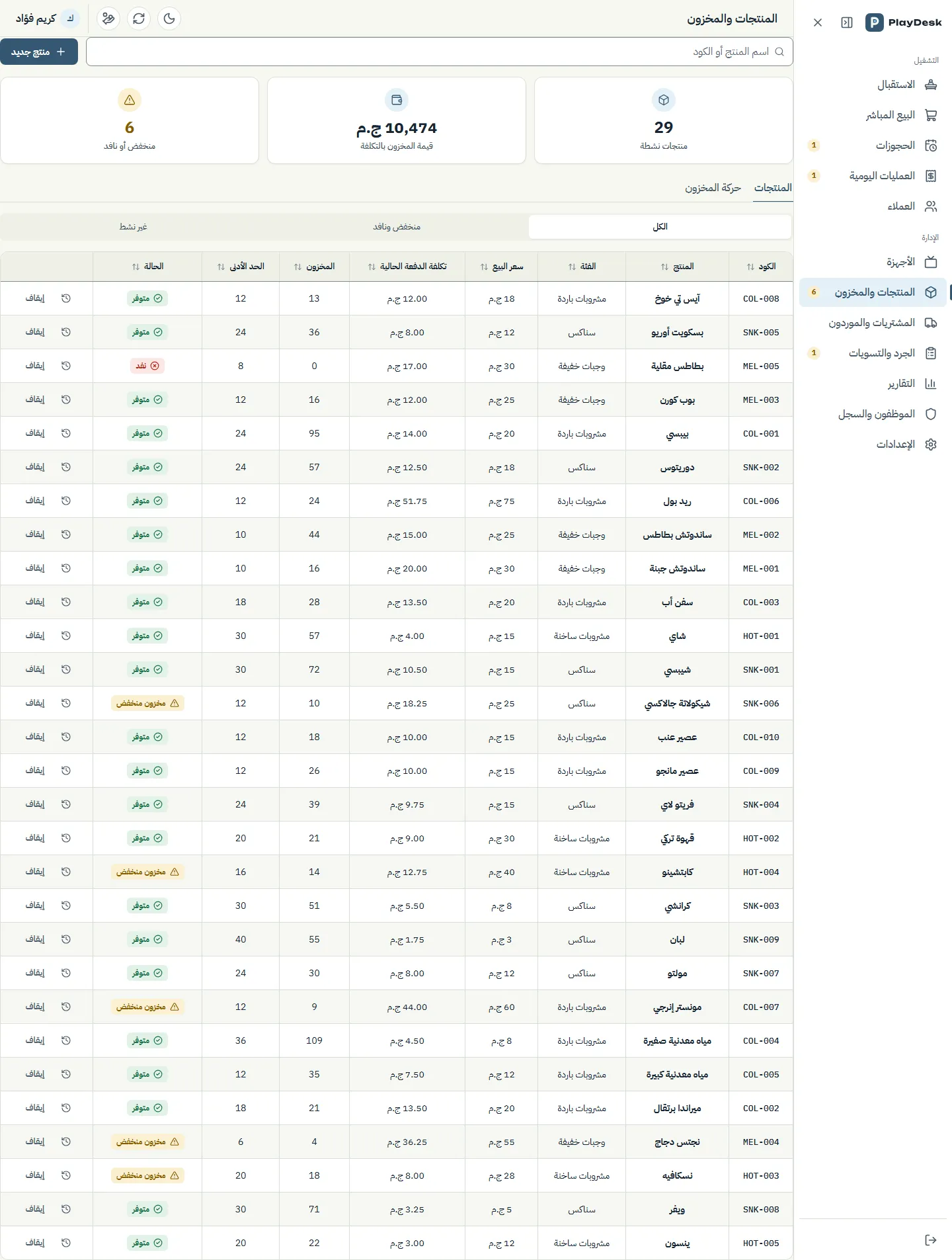
A system that runs a PlayStation lounge from the first minute of a session to the cash count at the end of the night. Each room shows its timer and running charge, the price follows the play type even if it changes halfway through, drinks and snacks come off stock as they are added, and a finished session cannot leave without payment, by cash, InstaPay or Vodafone Cash. Bookings cannot overlap, every correction leaves a record, staff see only the pages they are allowed, and each lounge's data is kept completely separate from every other lounge. The interface is Arabic, right to left, on desktop, tablet and phone.
- 45
- pages in the application
- 3
- payment methods: cash, InstaPay, Vodafone Cash
- 2
- receipt widths: 80 mm and 58 mm
- Sector
- Gaming lounges (PlayStation rooms), Egypt first
- System type
- One hosted product for many independent lounges
- Coverage
- Front desk, money, inventory, management, and a console for the operator
- Pages
- 45
- Users
- Lounge owner, staff with permissions per page, platform administrator
- Language and direction
- Arabic interface, fully right to left, light and dark themes
- Devices
- Desktop, tablet and phone, installable as an app (PWA)
A lounge sells time, and the time was kept on paper
These are the problems a PlayStation lounge meets when it runs on a notebook, a timer per room and the cashier's memory, and the system was built around them. This section describes working practice, not a measurement of how any one lounge worked.
Read the detailHide the detail5 points
- At the front desk
- — Start times are written down or remembered. When a group goes from two controllers to four halfway through, the price is guessed and rounded however the cashier prefers.
- Money
- — Cash and wallet transfers share one drawer, wallet fees are applied inconsistently, and a correction is made by crossing out or deleting, so the books can change after the fact.
- Inventory
- — Drinks and snacks are counted by eye. The cost is unknown, so profit per product is a guess and losses show up at the end of the month.
- Bookings
- — A phone call or a message, written on a slip of paper, and two customers can be promised the same room.
- Management
- — The owner cannot see the day without being there, and cannot tell who changed what.
Built around the session
Read the detailHide the detail
Before any screen, we worked out what a lounge actually does in a day, in the owner's own words, and wrote it down as one specification where every element on every screen has its exact Arabic text and its behaviour.
That gave the system three decisions. The session is the unit of work: stock, receipts, the daily close and reports all hang off the session and its payment, so that is where the system is strictest. Money is never edited, only added to: a correction is a new entry with a reason, not an overwrite. And a lounge must never see another lounge: because the product is hosted once for many owners, keeping each lounge's data completely separate came first, before any feature.
We built it screen by screen and checked each one on a desktop, a tablet and a phone, in both themes, before moving on.
A session, from the first minute to the daily close
A session moves through one enforced sequence. The system itself holds the gates between the steps, so the cashier cannot skip one by accident.
A GOVERNED LOOP7
- 01Start a room
- 02Switch play type
- 03Add drinks and snacks
- 04End the session
- 05Pay
- 06Receipt
- 07Daily close
- Back to 01
Read the detailHide the detail13 points
- 01
Start a room
The cashier picks the play type, a plan (open, or one to four hours) and the customer or a walk-in. The room card starts its timer, and a banner appears five minutes before a timed plan ends.
- 02
Switch play type
Going from single to multi-player midway closes one stretch of time and opens the next, each at its own price. The switch can be undone within two minutes.
- 03
Add drinks and snacks
Items go onto the session and come off stock at the same moment, oldest stock first.
- 04
End the session
Time stops, the charge is worked out from the stretches played, and checkout opens. There is no pay-later.
- 05
Pay
Cash with the amount received and the change due, InstaPay, or Vodafone Cash. For wallet payments the sender's number is required and the fee is added as its own line.
- 06
Receipt
Printed at 80 mm or 58 mm with the lounge's logo, automatically if the lounge chooses.
- 07
Daily close
Operations are listed per business day, 6 a.m. to 6 a.m. by default. The cash hand-over shows the expected drawer, the amount handed over, and the surplus or shortage.
A finished session cannot leave unpaid
Ending a session opens checkout straight away. Nothing is left open to be paid later and forgotten.
Exact time, rounded once
Each stretch is charged for its exact time. The total of the stretches is rounded once, to the nearest 5 EGP, never stretch by stretch.
The wallet fee has a table
By default Vodafone Cash carries no fee up to 200 EGP, 5 above 200 up to 500, and 10 above 500. Each lounge can edit the table.
A booking cannot land on a busy room
The board refuses overlaps, closed hours and maintenance, and warns when a room has a session running right now.
Nothing is edited, only added to
A correction is a new entry linked to the original. Deleting means voiding, with a reason: staff send a request and the owner decides.
A double tap cannot charge twice
A repeated tap or a retry on a weak connection returns the first result instead of charging again, and only one session can be open in a room.
The same sequence applies to every cashier and every lounge, and the owner can see each step afterwards.
The departments
88departmentsONE PLATFORM
- Reception
- Sales
- Bookings
- Daily operations and customers
- Inventory and purchasing
- Reports
- Staff and permissions
- Platform
Read the detailHide the detail8 points
- Reception
- Live room cards with a status lamp, timer and running charge, controller counts, and the session drawer to start, switch, add items and end.
- Sales
- Checkout by cash, InstaPay or Vodafone Cash, receipts at two widths, and direct sales of drinks and snacks without a session.
- Bookings
- A board with an alarm-style time picker and a timeline for each room that refuses overlaps, closed hours and maintenance.
- Daily operations and customers
- Invoices and expenses for each business day, expense approval, edit and void requests, the cash hand-over, and customers with codes and their history.
- Inventory and purchasing
- Products and categories, stock with its cost, suppliers and purchase invoices, and stock counts where every difference has a reason and the owner approves.
- Reports
- Revenue and profit, product performance with the margin on each product, and expenses by category.
- Staff and permissions
- Hidden, view or edit for each employee on each page, sign-in history, an activity log of every change, and the lounge's own settings, rooms and prices.
- Platform
- Free trial sign-up, a guided setup, subscription plans, and a console where the operator reviews payments and sees every lounge's status.
Arabic first, and built for the phone
The interface is Arabic and runs right to left on every screen. A cashier can run the floor from a phone, and the app can be installed on Android and iOS like any other.
Read the detailHide the detail5 points
- The grid of rooms becomes a single column, and the side menu becomes a floating button.
- Every button is large enough for a finger to hit the first time.
- The time-is-up alert enlarges its buttons instead of squeezing them.
- Wide tables turn into cards, with the call and WhatsApp buttons kept beside the number.
- Pages you have already opened stay readable if the connection drops, and light and dark are both there.
Reception on the phone
The screens
47 screensThe application and its screens are real; the data in the screenshots is not. Everything shown was created in a separate demo lounge, which was deleted after the screenshots were taken. The lounge's name, the staff, the customers, the phone numbers and every amount are invented and belong to no real lounge or customer.
Reception
Sales and receipts
Bookings
Daily operations and customers
Inventory and purchasing
Reports
Staff, permissions and settings
Platform: subscriptions for lounges
Light and dark, desktop and phone
Sign-up and setup
What changes in how a lounge runs
| How a lounge typically runs | With PlayDesk |
|---|---|
| Paper notes, a stopwatch or a phone timer for each room | A timer on every room card, with a warning five minutes before a timed plan ends |
| A change in the number of players is estimated and rounded by the cashier | Each stretch is charged for its exact time and the total is rounded once |
| One drawer for everything, wallet fees applied from memory | Checkout by method, a required sender number, a fee table the lounge controls, and the change worked out |
| Corrections by crossing out or deleting | Corrections and voids with a reason; nothing disappears |
| Stock counted by eye, cost unknown | Stock with its cost, low-stock warnings, counts the owner approves, and profit on each product |
| Bookings on paper or in messages, so double promises happen | A board that refuses overlaps, closed hours and maintenance |
| An end-of-night cash count against memory | The expected drawer, the amount handed over, and the surplus or shortage |
| The owner has to be there to see the day | Reports, an activity log and permissions from any device |
| Each extra lounge means a separate notebook | One product for many lounges, each one's data completely separate from the rest |
How a lounge typically runs
Paper notes, a stopwatch or a phone timer for each room
With PlayDesk
A timer on every room card, with a warning five minutes before a timed plan ends
How a lounge typically runs
A change in the number of players is estimated and rounded by the cashier
With PlayDesk
Each stretch is charged for its exact time and the total is rounded once
How a lounge typically runs
One drawer for everything, wallet fees applied from memory
With PlayDesk
Checkout by method, a required sender number, a fee table the lounge controls, and the change worked out
How a lounge typically runs
Corrections by crossing out or deleting
With PlayDesk
Corrections and voids with a reason; nothing disappears
How a lounge typically runs
Stock counted by eye, cost unknown
With PlayDesk
Stock with its cost, low-stock warnings, counts the owner approves, and profit on each product
How a lounge typically runs
Bookings on paper or in messages, so double promises happen
With PlayDesk
A board that refuses overlaps, closed hours and maintenance
How a lounge typically runs
An end-of-night cash count against memory
With PlayDesk
The expected drawer, the amount handed over, and the surplus or shortage
How a lounge typically runs
The owner has to be there to see the day
With PlayDesk
Reports, an activity log and permissions from any device
How a lounge typically runs
Each extra lounge means a separate notebook
With PlayDesk
One product for many lounges, each one's data completely separate from the rest
This table describes the change in working practice. No operating figures are shown: nothing was measured.