Industrial manufacturing · Live in production
A fully custom ERP for a manufacturer
From paper, Excel and WhatsApp to one platform covering 13 departments.
- Client
- Good Steel Chute Systems — Manufacture and installation of waste and refuse chute systems
- System type
- Fully custom ERP — built around the company’s actual operations, not an off-the-shelf package bent to fit
- Build time
- ~10 weeks
- Our role
- End to end — discovery, design, build, deployment
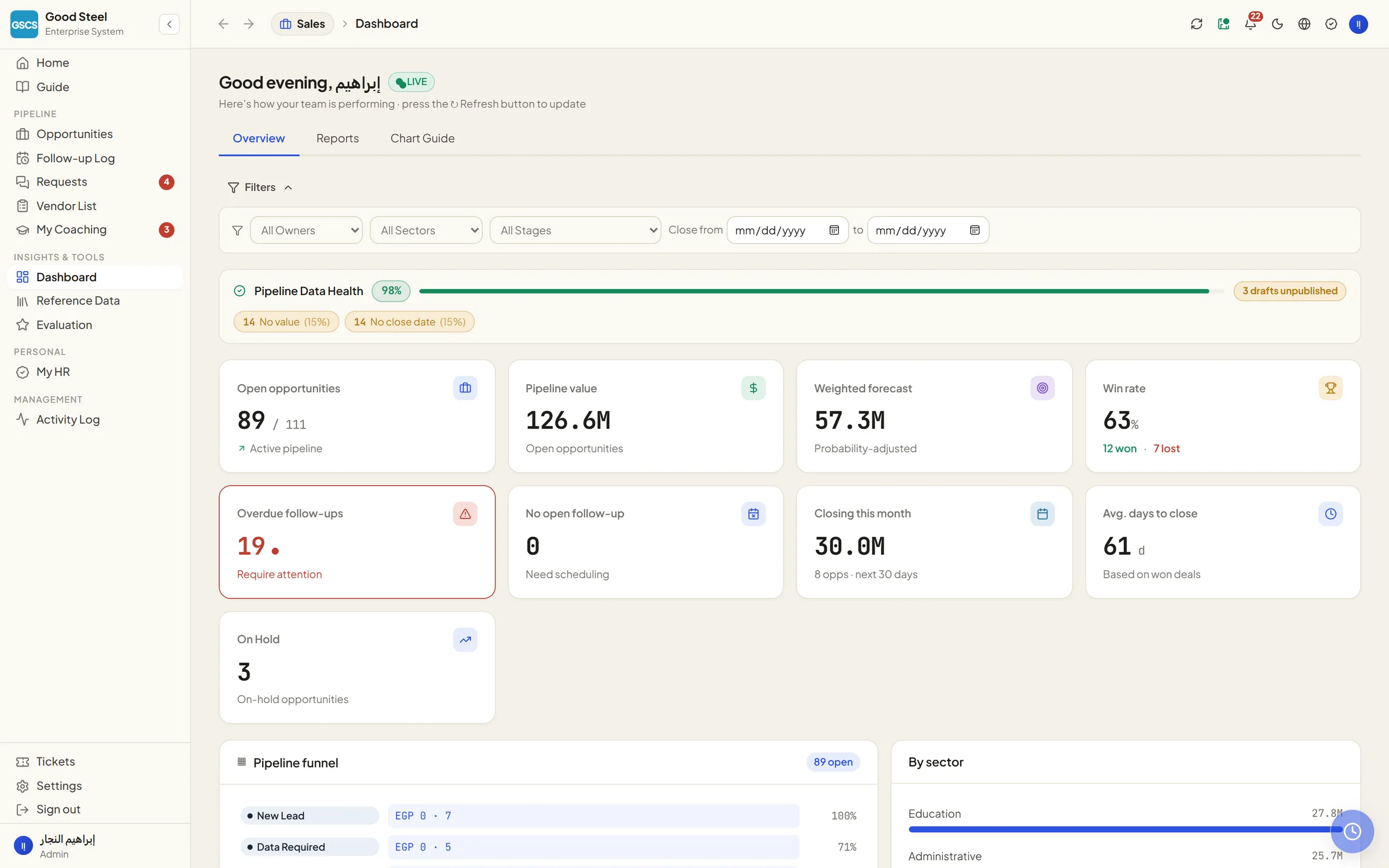
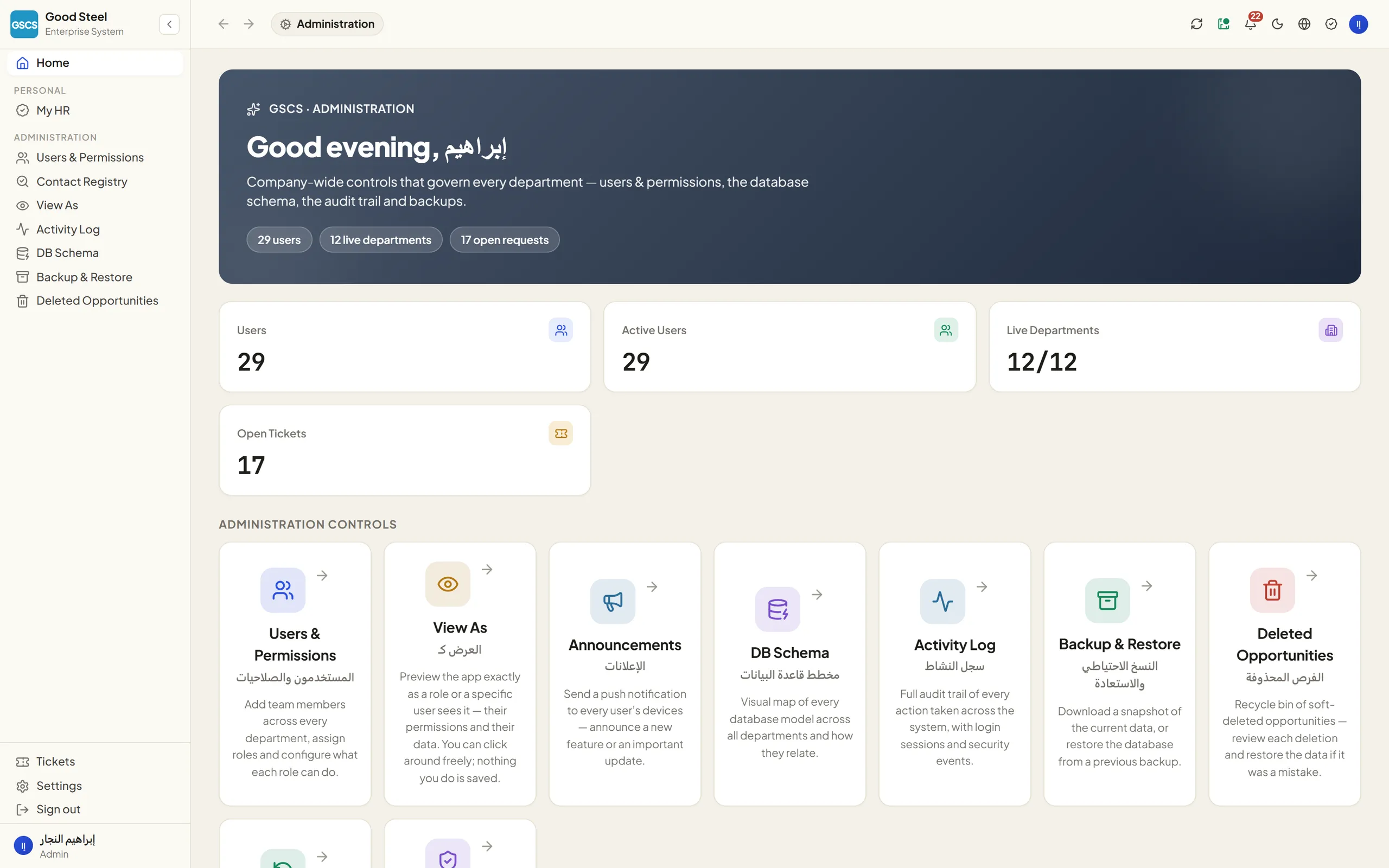
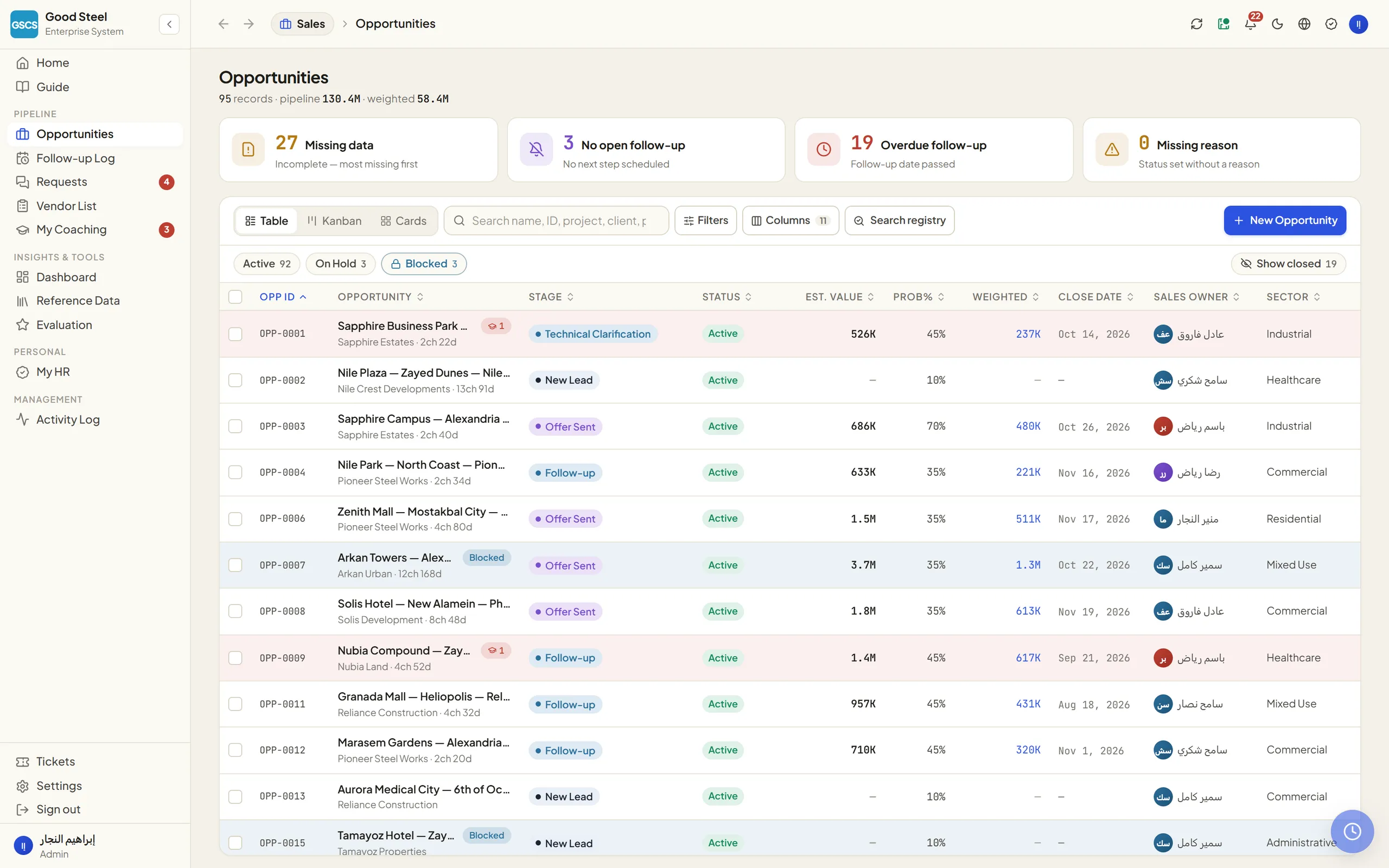
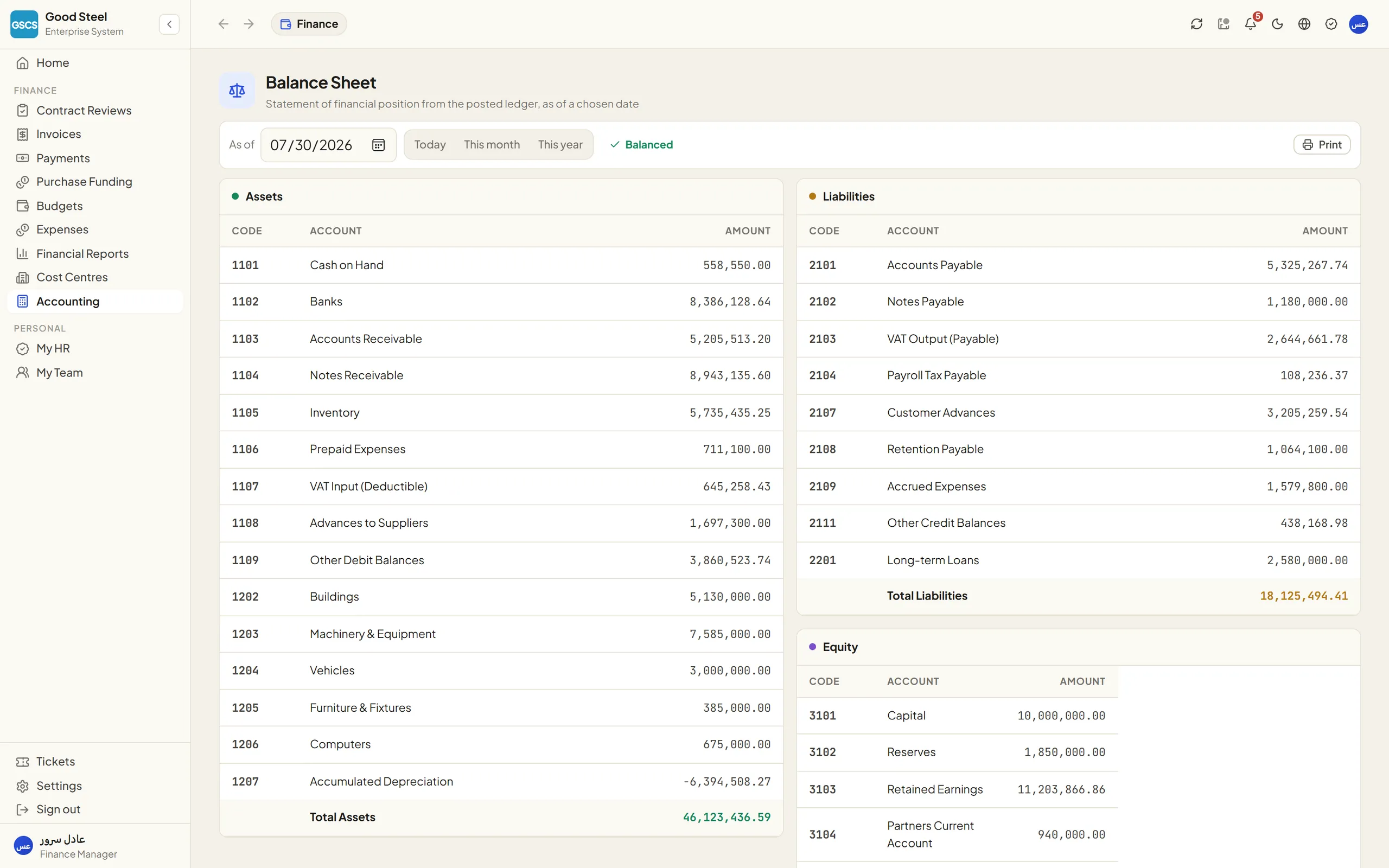
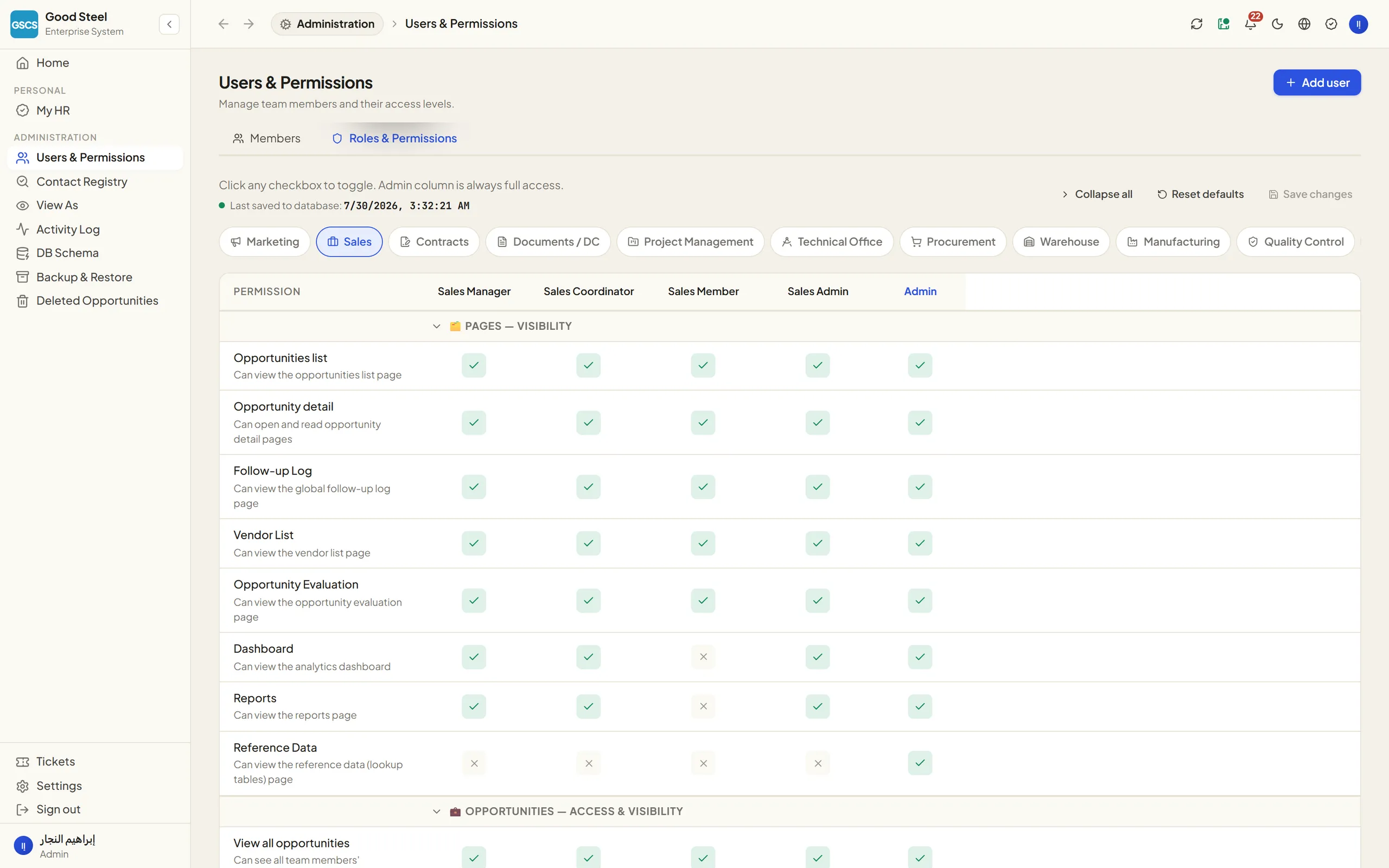
We took a manufacturer whose entire operation was spread across paper, Excel, WhatsApp and a separate program for every department, and replaced it with one platform covering 13 departments — from the first customer call to the quote, the contract, manufacturing, the warehouse, quality, on-site installation, the invoice and the accounting entry — in one interface, with data entered once, and a record of every movement.
- 13
- departments
- 191
- screens
- 384
- API endpoints
- 192
- database tables
- 17,057
- bilingual strings
- 50–100
- internal users
- ~10
- weeks to production
- Sector
- Industrial manufacturing and installation — chute systems for residential and commercial towers, hotels and hospitals
- System type
- Fully custom ERP, built around the company’s actual operations
- Coverage
- 13 departments · 191 screens · 384 API endpoints · 192 database tables
- Users
- 50 to 100 internal users, with different permissions for every role
- Languages
- Fully Arabic + English with real RTL support — 17,057 translated strings
- Devices
- Desktop, tablet and mobile (iOS and Android) — staff work from site the same way they work from a desk
- Build time
- ~10 weeks from nothing to live operation
The problem before the system
The company works in a field that combines technical selling, manufacturing and installation on construction sites — three worlds that operate nothing like each other. The result was that every department built its own tools.
Read the detailHide the detail8 points
- Sales
- — tracked opportunities in Excel files, and follow-ups lived in someone’s head or on WhatsApp.
- Pricing
- — was calculated by hand from scratch every time, so the price changed depending on who calculated it.
- Contracts and documents
- — were printed paper plus folders on different machines, and any review meant hunting for the latest version.
- Warehouses
- — ran on handwritten sheets, and the real balance was only known after a stocktake.
- Procurement
- — happened by phone and WhatsApp, and supplier offers were compared on a sheet of paper.
- Sites
- — requested material by message, material was issued on a slip, and consumption was recorded later — or not at all.
- Finance
- — re-entered everything from the beginning, because it did not trust anyone else’s numbers.
- HR
- — kept attendance, leave and payroll on paper and in Excel.
The core problem was not a shortage of tools. It was that the same piece of data was re-entered in every department, which produced conflicting versions of the truth with no way to tell which one was right. Alongside it sat real problems that existed but were invisible: dead stock, neglected opportunities with no follow-up, quantity discrepancies, and purchase orders nobody could explain.
Understand how the work actually runs, then build on it
Read the detailHide the detail
We did not start by writing code. We started by sitting with each department and documenting how it actually works — not how it is supposed to work — then formalised that into a single official operating cycle, and built a system that enforces that cycle in the code itself.
This is the fundamental difference between this system and any off-the-shelf product. An off-the-shelf product asks the company to change to suit it. Here it is the other way round: the system knows that a chute is measured by number of buildings and floors, that the central store is the single control point for material, that quality is what allows material into the warehouse, and that pricing is built on engineering drawings that must be attached first.
The operational core: a governed material loop
The most important thing about the system is that it does not just store data — it blocks skipped steps. The full material loop is implemented in code, in its mandatory order.
A GOVERNED LOOP6
- 01Execution on site
- 02Central store
- 03Procurement
- 04Goods receipt
- 05Quality
- 06Into stock, then to site
- Back to 01
Read the detailHide the detail10 points
- 01
Execution on site
The project engineer raises a material request.
- 02
Central store
The single control point. Material available → a transfer note moves it to the site store. Material short → a purchase request.
- 03
Procurement
Request for quotation, three-supplier comparison on the same line items, then a purchase order and its approval.
- 04
Goods receipt
Received from the supplier in a pending-inspection state. Not stock yet — it moves no balance.
- 05
Quality
Inspection. Approval posts the quantity into stock; a rejection stops it and opens a non-conformance report.
- 06
Into stock, then to site
Official stock entry, transfer to the site store, installation, final inspection.
The central store is the single control point
Every material movement passes through a warehouse and is written to an append-only ledger that cannot be edited or deleted from — the balance is a calculated result of the movements, not a number typed in by hand.
Procurement never buys for a project directly
Every purchase order traces back to a purchase request raised by the store, which traces back to a material request from a site. There is no path in the system that lets an execution user buy anything.
Execution requests, it does not buy
Material demand originates in the projects workspace only.
Quality is the gate to stock
Received goods are not available stock until they are inspected. The quality approval is what posts the quantity; a rejection opens a non-conformance report.
The practical result: anyone reading a material balance today can trace every unit of it back to the purchase order, the supplier, the inspection report, and the site that consumed it.
The departments
1313departmentsONE PLATFORM
- Marketing
- Sales
- Contracts
- Document control
- Project management
- Technical office
- Procurement
- Warehouses
- Manufacturing
- Quality control
- Finance & accounting
- Human resources
- Administration
Read the detailHide the detail13 points
- Marketing
- Capture leads, qualify them, hand them to Sales with credit retained on both sides (dual attribution), and a return queue for anything that needs completing.
- Sales
- Opportunities across 12 stages, follow-ups with overdue alerts, contacts, pricing requests, approved supplier lists and performance dashboards — with the pricing tools: a quick calculator (a range) and a detailed one (a firm number) built on an item catalog and material cost, plus a print-ready customer quote.
- Contracts
- Turn a won opportunity into a contract, bills of quantities that derive the contract value, and financial and technical reviews.
- Document control
- A coded document register, revisions and issues, transmittals, approvals, an archive, and 15 ready print forms — payment certificate, inspection request, non-conformance, technical query, meeting minutes, as-built and more.
- Project management
- The project with its phases, tasks and calculated progress, site visits, material requests, daily consumption, snag lists and final handover.
- Technical office
- Shop drawings, quantity take-off, submittals and technical queries.
- Procurement
- Requests for quotation, three-supplier comparison on the same line items, purchase orders and their approval, and supplier evaluation.
- Warehouses
- Balances against min/max levels and a reorder point, the movement ledger, receiving, transfer notes, and stocktaking with its variances.
- Manufacturing
- Work orders, the production schedule, machines, daily output and maintenance.
- Quality control
- Inspections by type, checklists, tests and their results, non-conformance reports and corrective actions, and certificates.
- Finance & accounting
- Customer and supplier invoices, payments and their allocation, expenses, budgets, cost centres — and a full accounting cycle: chart of accounts, journal entries, trial balance, income statement, balance sheet, general ledger and tax reports.
- Human resources
- A complete employee file, an interactive org chart, geolocated attendance, leave and balances, payroll and payslips, advances and deductions, insurance, end of service, performance appraisal and recruitment.
- Administration
- Permissions, a central activity log, user tracking, announcements, internal requests, backups and company identity.
Arabic and English, equally
Read the detailHide the detail4 points
- 17,057 translated strings in a single source, and any new text without its translation stops the build.
- A complete direction flip: the sidebar, column order, arrows, menus, forms and charts.
- Arabic names for employees, job titles and departments appear exactly as they do in the company’s own documents, while numbers, dates and document codes keep their correct Latin order so the browser cannot reorder them.
- Switching language is instant and remembered on the user’s device — no reload, no waiting on the server.
In this image set, every screen is captured in both versions so you can compare them yourself.
English
Arabic
English
Arabic
English
Arabic
Works from anywhere, including mobile
A large share of the system’s users do not sit at a desk: site engineers, installation supervisors, storekeepers, procurement staff. The interface is responsive at every size and tested on iOS, Android and desktop.
Read the detailHide the detail4 points
- Staff record attendance from site with geolocation, request material, log the day’s consumption and file a site visit — from a phone.
- A manager approves a purchase order, a leave request or a contract review from mobile without going back to the office.
- Wide tables scroll horizontally inside their own frame instead of breaking the page, forms collapse to a single column, and touch targets and font sizes are set so the phone does not zoom the screen when typing.
- Dynamic viewport units are used so the Android address bar does not cut off the bottom of the screen.
One platform, every department
The screens
97 screensThe screens on this page are from the live system in operation, captured in both the Arabic and English versions and at different screen sizes. All names of people, customers, suppliers and projects, contact details and document numbers are demo data, fully substituted, to protect the confidentiality of the company and its clients. The functionality, the calculations, the layout and the business logic are exactly as they are in the system.
Overview
Sales
Marketing
Pricing
Contracts & document control
Project management
Warehouses
Procurement
Quality control
Manufacturing
Finance & accounting
Human resources
Technical office
Platform & governance
The impact on the business
| Before | After |
|---|---|
| Paper + Excel + WhatsApp + a separate program per department | One platform, 13 departments, one source of data |
| The same data re-entered in every department | Entered once — every other department reads from it |
| Every department had its own version of the truth | One agreed figure, calculated rather than typed |
| Work ran on memory and trust | Every movement documented and auditable |
| Problems existed but were invisible | The system surfaced them, so they could be fixed |
| Errors were caught late, at the invoice | Prevented at entry, or visible the same day |
| Follow-up depended on staff remembering | Overdue alerts, and no opportunity is forgotten |
| Work was tied to the office and to paper | Done from site and from a phone |
Before
Paper + Excel + WhatsApp + a separate program per department
After
One platform, 13 departments, one source of data
Before
The same data re-entered in every department
After
Entered once — every other department reads from it
Before
Every department had its own version of the truth
After
One agreed figure, calculated rather than typed
Before
Work ran on memory and trust
After
Every movement documented and auditable
Before
Problems existed but were invisible
After
The system surfaced them, so they could be fixed
Before
Errors were caught late, at the invoice
After
Prevented at entry, or visible the same day
Before
Follow-up depended on staff remembering
After
Overdue alerts, and no opportunity is forgotten
Before
Work was tied to the office and to paper
After
Done from site and from a phone
Tangible results as the company describes them: fewer errors · less time per process · higher data accuracy · problems that surfaced for the first time and could therefore be solved · data entered only once · and new customers won because the way the company works is now professional and documented in front of the client and the consultant.