B2B services sales — management systems for local businesses
Masaro CRM
A CRM in Arabic that holds the whole customer journey, from the first message to an active client, and tells the sales team every morning who to contact next, what is late and what money is due.
- System type
- CRM covering sales, follow-up, collections and after-sale, on desktop and phone, with three roles
- Our role
- Full build — understanding how the sales day really runs first, then building and checking it screen by screen
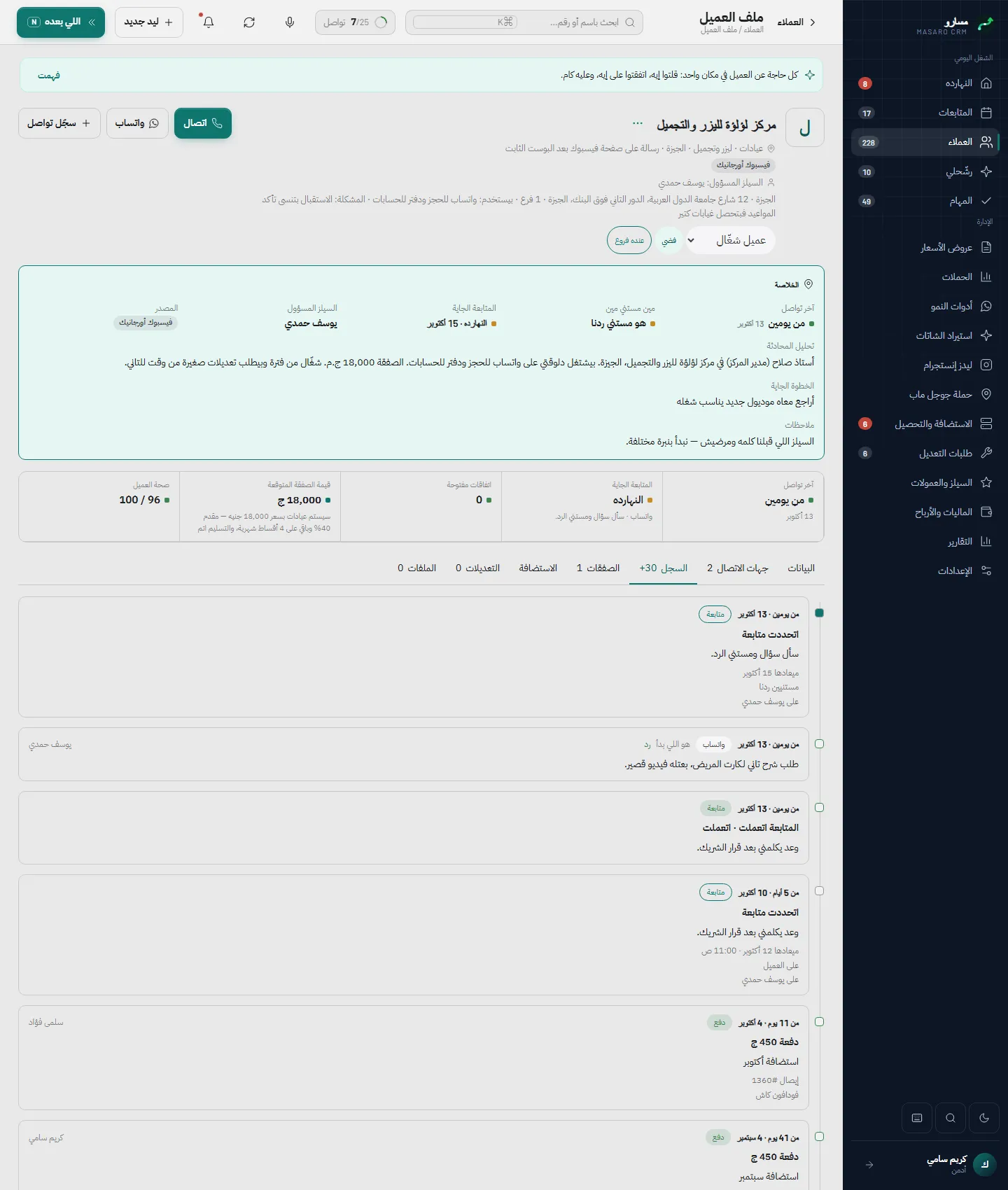
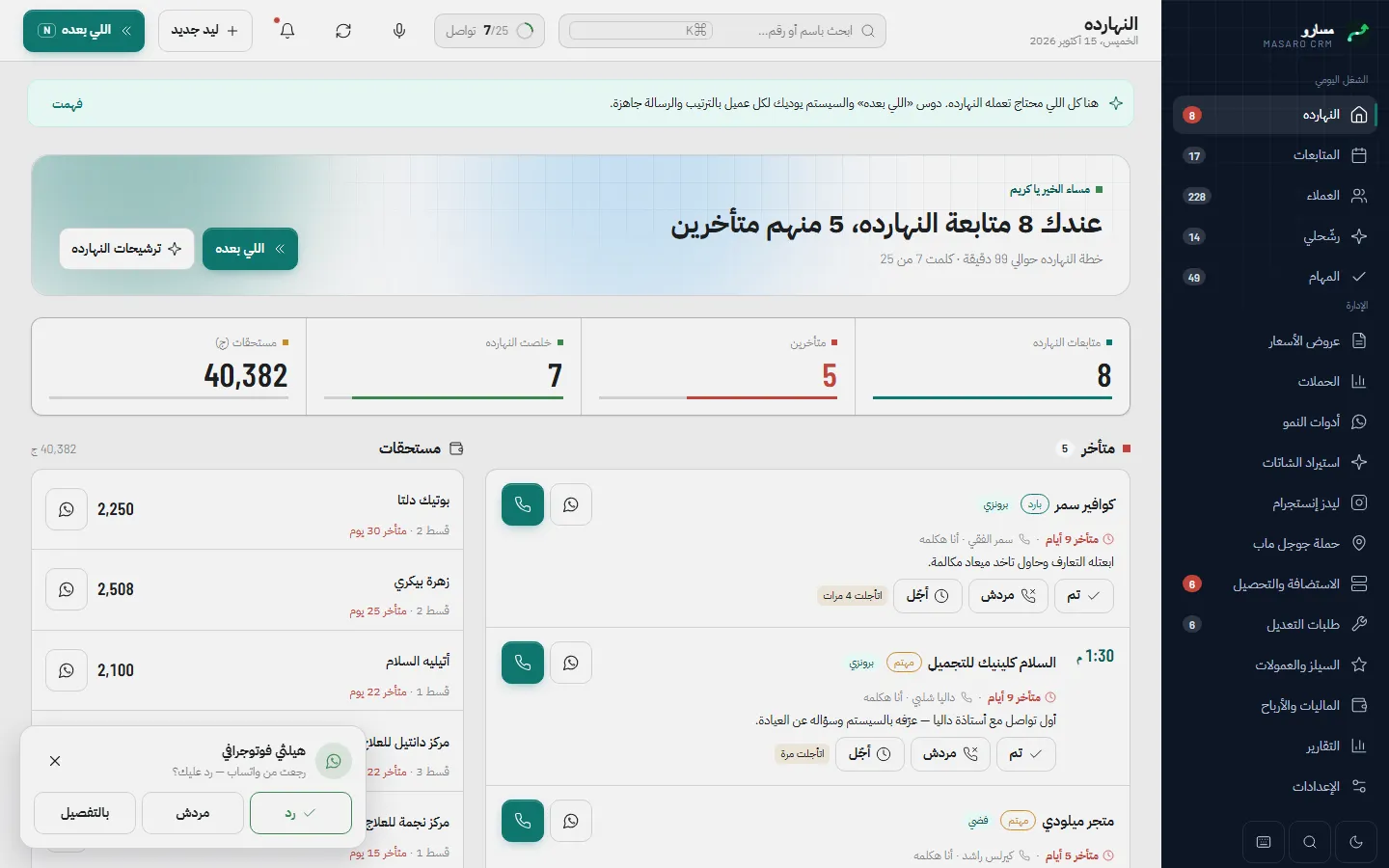
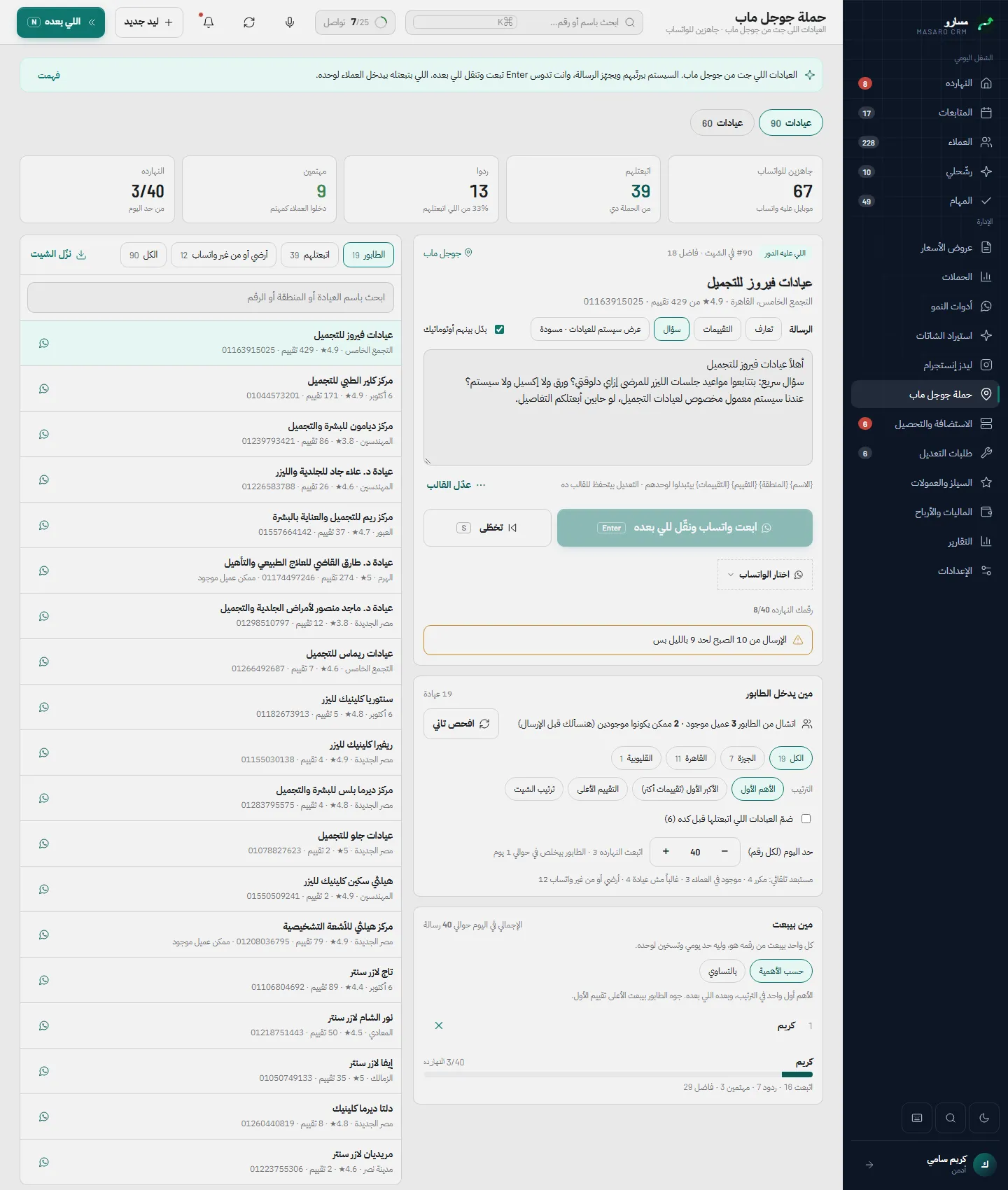
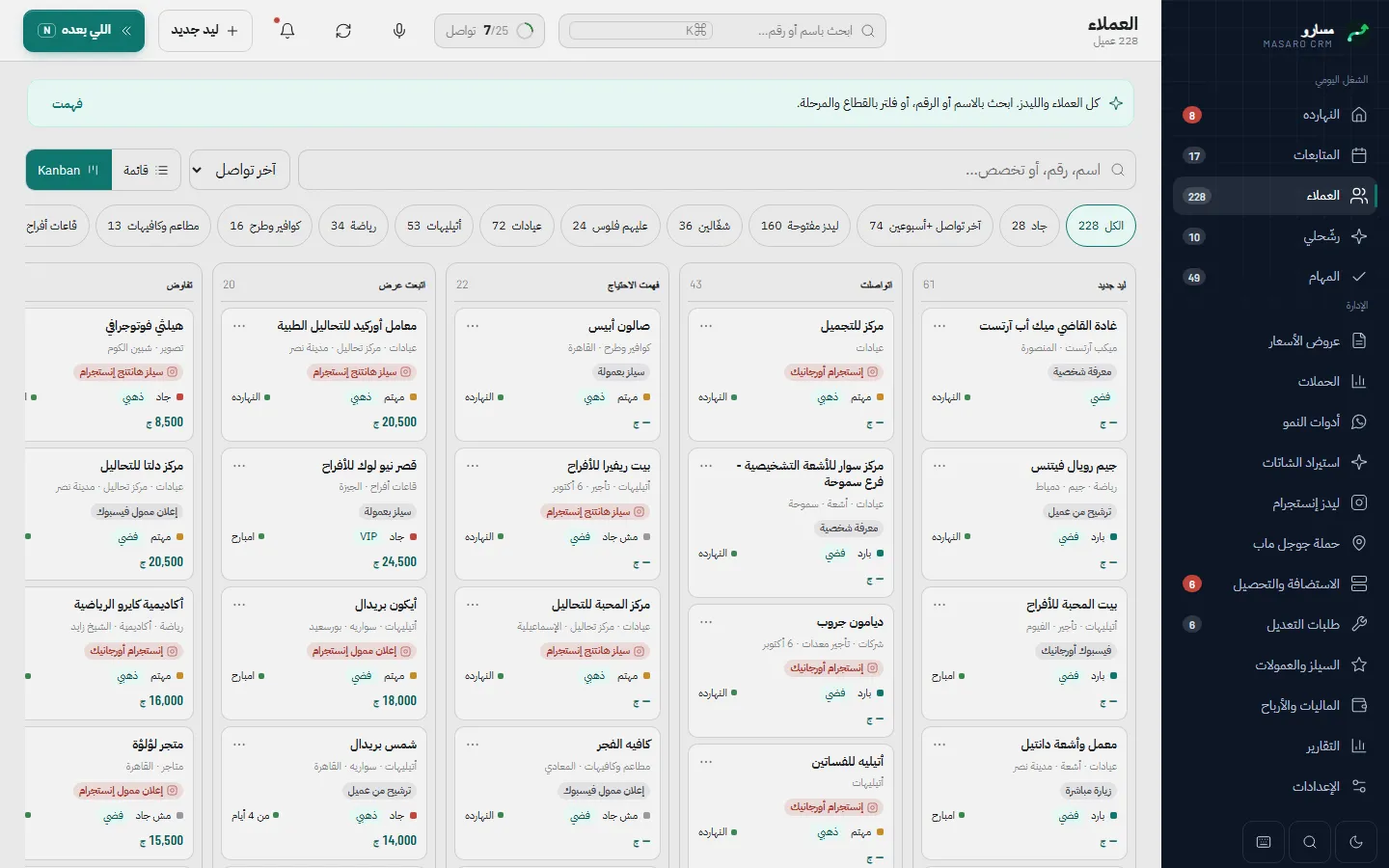
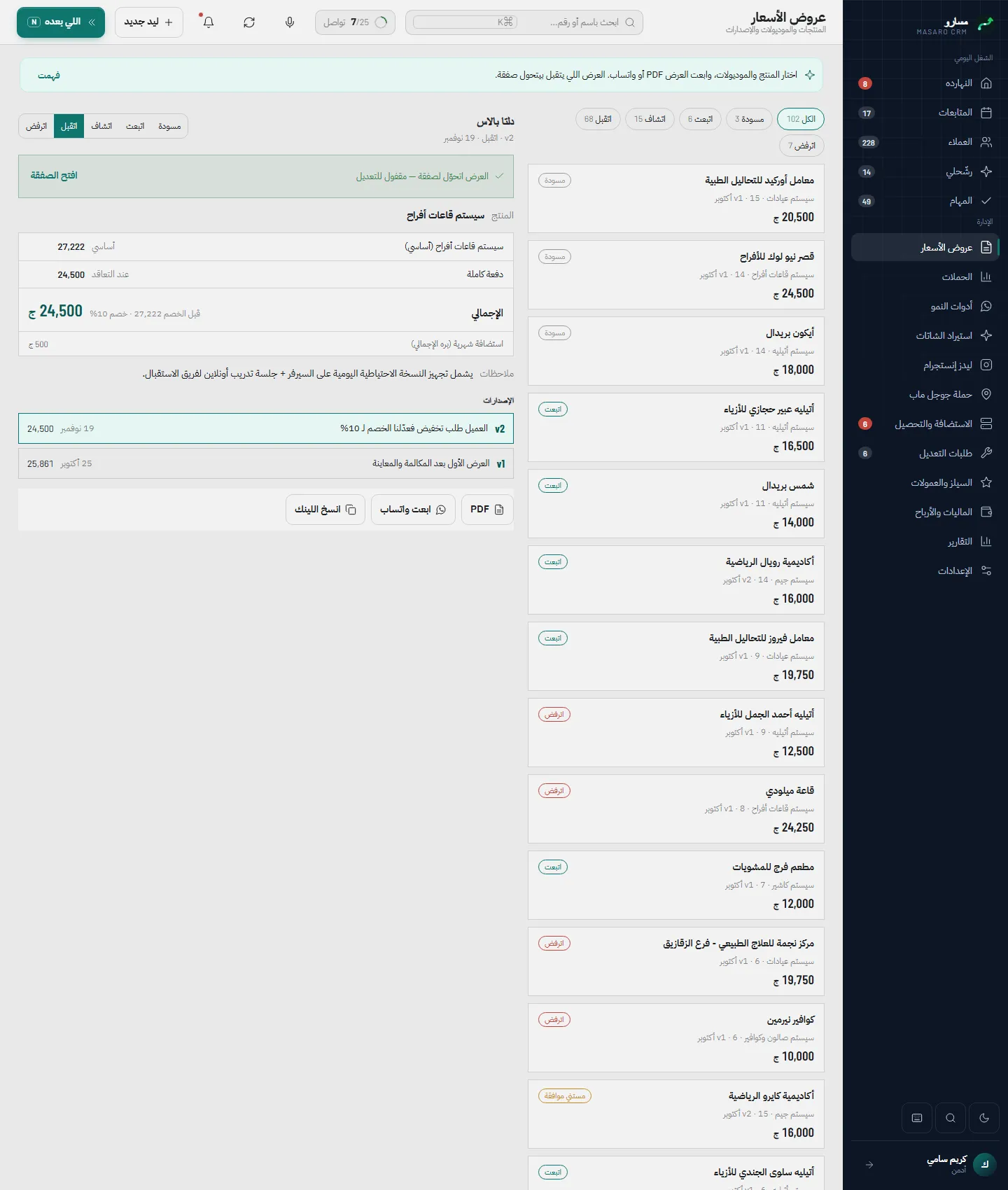
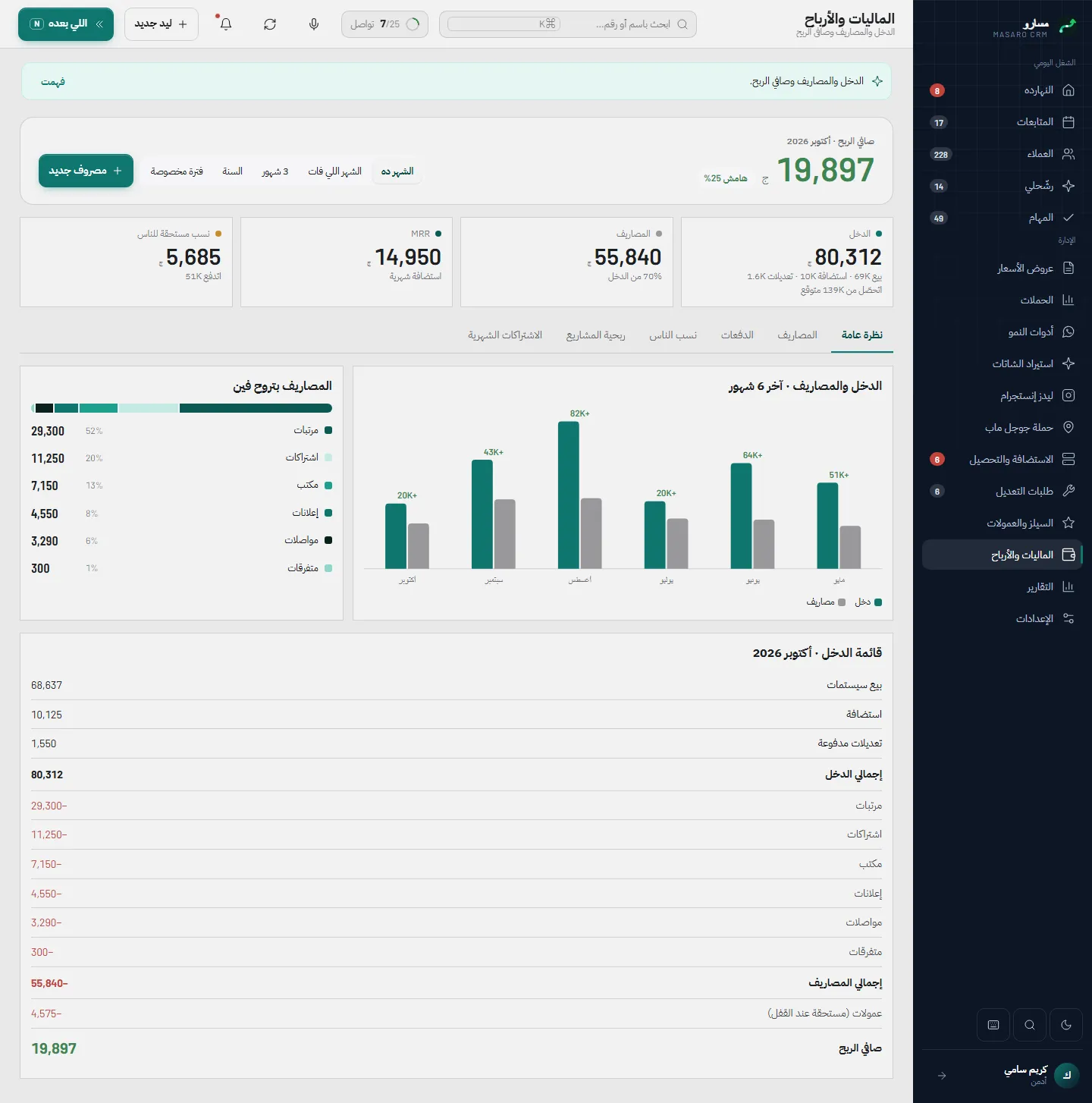
A CRM that follows a customer from the first contact to an active client. Each morning the Today screen shows who needs a reply, what is overdue and what money is due, and Next-up walks the salesperson through one client at a time. Clients sit on a nine-stage pipeline with a duplicate check before any lead is created, quotes keep their versions and turn into a deal with instalments and commissions, and hosting renewals and change requests are scheduled after the sale. Outreach from Google Maps, Instagram and WhatsApp chats is paced and reviewed before anything is sent. Three roles see only what they should, every change is recorded with who made it and when, and the whole interface is Arabic, right to left, on desktop and phone.
- 31
- pages in the application
- 9
- stages on the sales pipeline
- 3
- roles: Admin, Sales, Support
- 16
- permissions an admin can switch per role
- Sector
- B2B services sales: management systems for local businesses
- System type
- CRM for sales, follow-up, collections and after-sale
- Coverage
- First contact, offer, deal and collection, then subscription, hosting and change requests
- Pages
- 31: 21 behind sign-in, 7 public and 3 printable PDF pages
- Users
- Three roles: Admin, Sales, Support, with editable permissions
- Language and direction
- Arabic interface, fully right to left
- Devices
- Desktop, Android and iOS, installable as an app (PWA), light and dark
What a sales team runs on without a system
These are the problems a sales team meets when it runs on Excel sheets and conversations scattered across Instagram and WhatsApp, and the system was built around them. This section describes working practice, not a measurement of how any one company worked.
Read the detailHide the detail5 points
- Sales
- — Leads arrive from several sources and nobody can tell that the person a colleague spoke to yesterday is the one being contacted today. The same client ends up recorded twice.
- Follow-up
- — A small promise such as «I will send the offer tomorrow» lives in one person’s head, and follow-ups get forgotten.
- Quotes and collections
- — The quote is in one file, the payments in another sheet, and commissions are worked out by hand.
- After the sale
- — Domain and hosting renewals and change requests have no single schedule.
- Management
- — The owner has no screen showing who did what, and no way to keep a salesperson away from the money figures.
Built around a journey that moves
Read the detailHide the detail
Before any screen, we worked out that the business is not «customer data». It is a journey that moves: lead, contact, need understood, offer, negotiation, closed, implementation, active client. The real gap was that nothing reminded the team of the next step.
That gave the system three decisions. The day is the unit: the first screen is Today, then Next-up shows one client at a time. Everything is recorded once: logging a contact updates the last contact, the daily goal and the next follow-up in the same moment. And the team works the same way anywhere: every screen works on a phone as it does on a desktop.
We built it screen by screen and checked each one on the phone and on the desktop before moving on.
The sales flow, from first message to active client
The pipeline has nine stages and is more than colours on a board: the system itself holds the gates and rules between them. Pausing is a side state a client can enter and leave.
A GOVERNED LOOP8
- 01Lead
- 02Contacted
- 03Need understood
- 04Offer
- 05Negotiation
- 06Closed
- 07Implementation
- 08Active client
- Back to 01
Read the detailHide the detail14 points
- 01
Lead
A new lead is recorded from a form, an import or by hand, after the duplicate check.
- 02
Contacted
Every contact is logged with its channel, outcome and any agreement that has a due date.
- 03
Need understood
What the client needs is written down and the next follow-up is set by how serious they are.
- 04
Offer
A quote with versions and a read-only public link; an offer with no reply raises a follow-up.
- 05
Negotiation
Discount and terms change as new versions of the same quote, so nothing is overwritten.
- 06
Closed
Closing needs an explicit confirmation, and then the deal, instalments and commissions are created together.
- 07
Implementation
Delivery is recorded and the client can follow the project phases on their own page.
- 08
Active client
The subscription and warranty start, with hosting renewals and change requests scheduled.
No duplicate leads
Before a lead is created the system checks the phone number, the Instagram handle and similar names, and shows who already owns that client.
Seriousness sets the next follow-up
A hot client comes back after 2 days, an interested one after 7, a cold one after 14, and these numbers can be edited in Settings.
Closing is confirmed, then complete
Accepting a quote creates the deal, its instalments and the commissions in one step, so one cannot exist without the others.
Pausing needs a reason
A paused client keeps the reason, open deals are marked lost with a reason such as price, timing or competitor, and a win-back follow-up is scheduled.
Support stays in its lane
Support staff can only move clients inside the implementation and active stages.
Imports never undo a person
Imports and the automatic reading of conversations never lower a stage that someone set by hand.
The same flow applies to everyone, and the owner sees every client wherever they are in it.
The departments
77departmentsONE PLATFORM
- Daily work
- Clients
- Growth and outreach
- Smart import
- Money
- After the sale
- Administration
Read the detailHide the detail7 points
- Daily work
- Today, Next-up, follow-ups, tasks and suggestions: the day planned for the salesperson.
- Clients
- A Kanban for the nine stages, a filterable list, and a profile with a digest and one timeline of every contact, agreement and payment.
- Growth and outreach
- Google Maps campaigns, paced WhatsApp sending across several senders, message templates per sector, ad campaigns, a public lead form and a client portal.
- Smart import
- Reads Instagram and WhatsApp exports, Excel files and screenshots, links each conversation to a client, and asks for a review before anything is added.
- Money
- Quotes with a public link, deals, instalments, collections with a PDF receipt, sales commissions, finance and reports.
- After the sale
- Subscriptions and hosting, domain renewals with alerts, and change requests on a board, marked free, warranty, paid or urgent.
- Administration
- Users and roles, the permission matrix, rule numbers, templates and sectors, the activity log and backups.
Arabic first, and built for the phone
The interface is Arabic and runs right to left on every screen. The daily screens have a phone version of their own, and the app can be installed on Android and iOS like any other.
Read the detailHide the detail5 points
- Wide tables turn into cards on a phone, with the call and WhatsApp buttons kept on each card.
- A bar along the bottom and a central add button put the most-used screens under the thumb.
- The public quote opens well on a phone, because most clients open it from a WhatsApp message.
- Installable as an app (PWA), in light and dark.
- Phone numbers show partly hidden until the user presses Show, according to permission.
Google Maps campaign on the phone
The screens
38 screensThe application and its screens are real; the data in the screenshots is not. The client company, Mersal Business Solutions, the team, the clients, the phone numbers and every amount shown are invented, and any resemblance to a real business is accidental.
Daily work
Clients and the pipeline
Growth and outreach
Quotes and offers
Money and after-sale
Settings, access and public pages
What changes in how the team works
| Without a system | With Masaro |
|---|---|
| Excel sheets and scattered chats | One place per client, with a timeline of every contact |
| Follow-up kept in each person’s head | Follow-ups, alerts and a Next-up queue that remind the team |
| The same lead recorded twice | A duplicate check before a lead is created |
| Quotes, payments and commissions in separate files | Quote, deal, instalments and commissions created together |
| No record of who did what | Every change recorded with who made it and when |
| Money figures open to anyone | Permissions by role, with numbers hidden where they should be |
Without a system
Excel sheets and scattered chats
With Masaro
One place per client, with a timeline of every contact
Without a system
Follow-up kept in each person’s head
With Masaro
Follow-ups, alerts and a Next-up queue that remind the team
Without a system
The same lead recorded twice
With Masaro
A duplicate check before a lead is created
Without a system
Quotes, payments and commissions in separate files
With Masaro
Quote, deal, instalments and commissions created together
Without a system
No record of who did what
With Masaro
Every change recorded with who made it and when
Without a system
Money figures open to anyone
With Masaro
Permissions by role, with numbers hidden where they should be
This table describes the change in working practice. No operating figures are shown: nothing was measured.