Car rental — offices and showrooms, starting in Egypt
Ostool
A system in Arabic and English that runs a car-rental office from one place: every car, booking, contract, handover on the phone, return, deposit, fine and daily cash close.
- System type
- Rental management system for offices of 3 cars up to multi-branch companies: fleet, contracts, field handover, money, fines and reports, on desktop, tablet and phone
- Our role
- Full build — working out how an Egyptian rental office really runs first, then building and checking it screen by screen
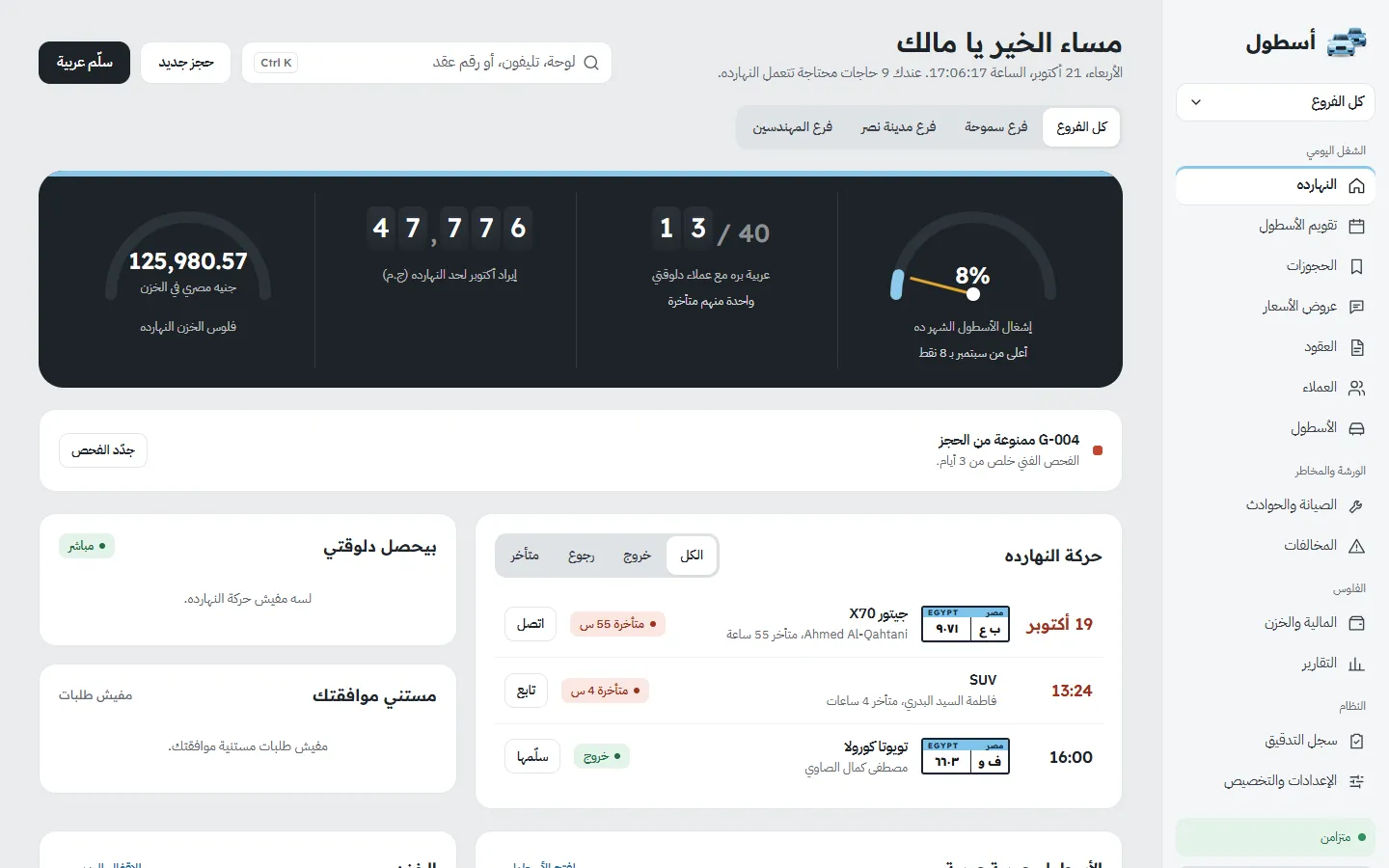
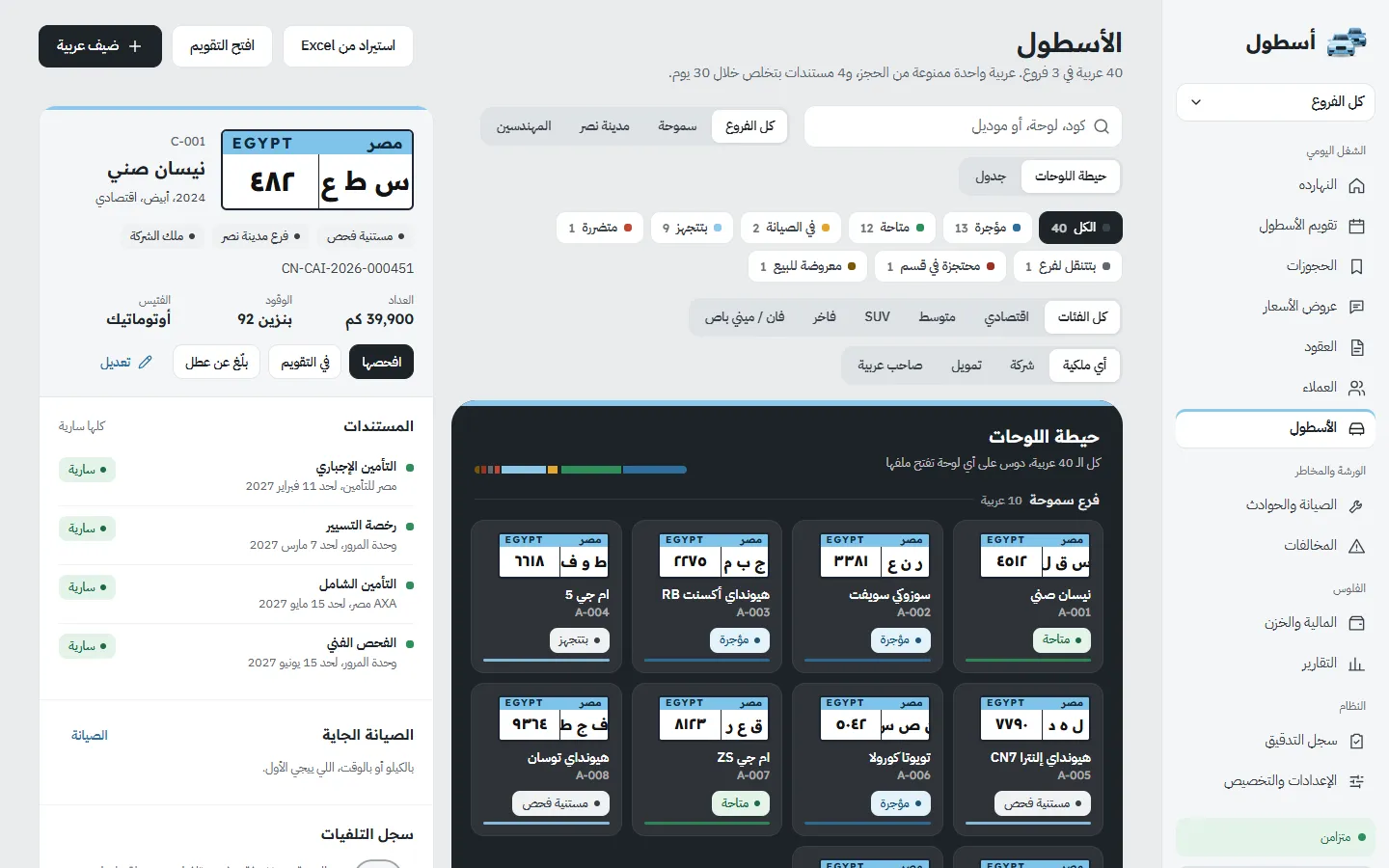
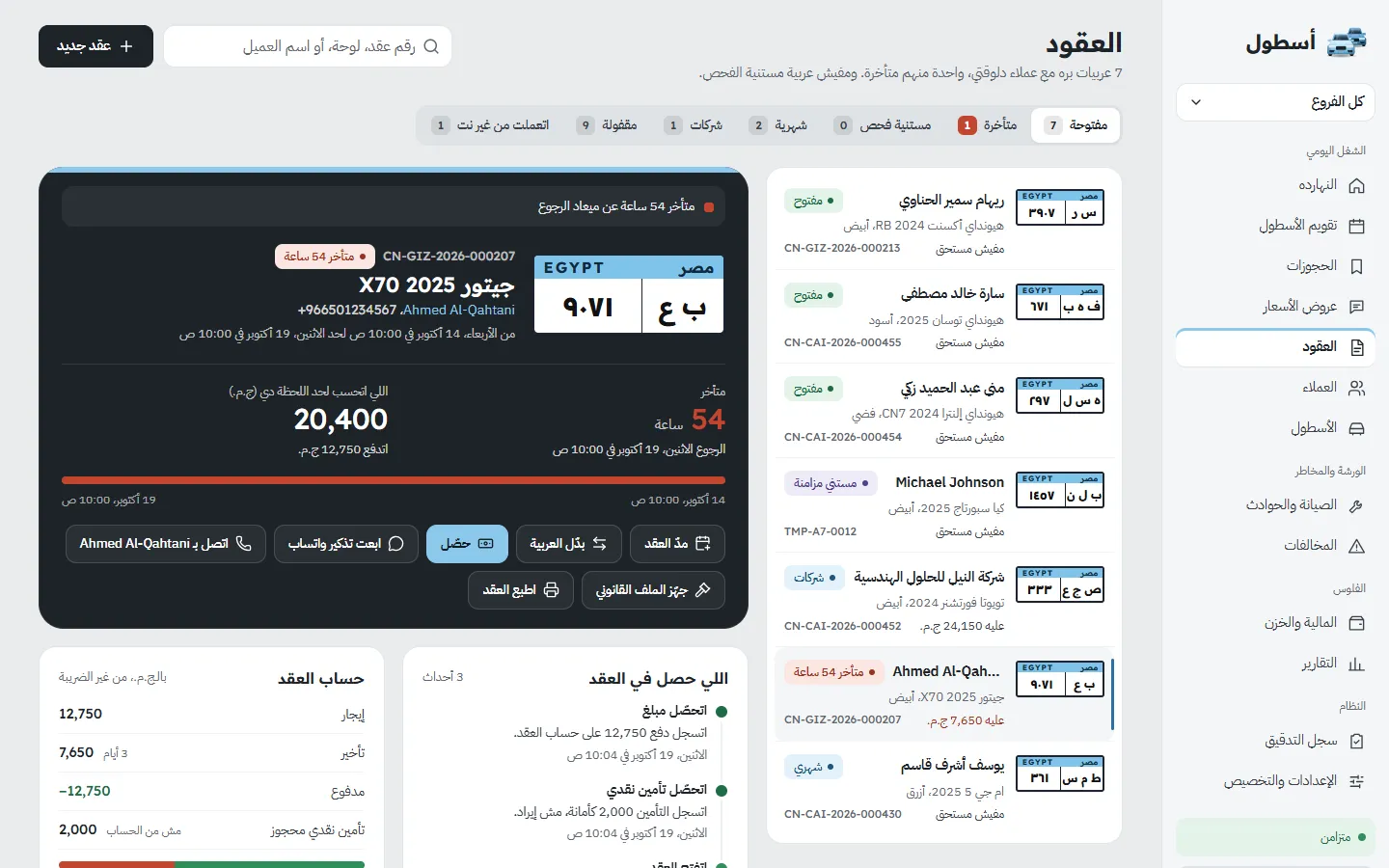
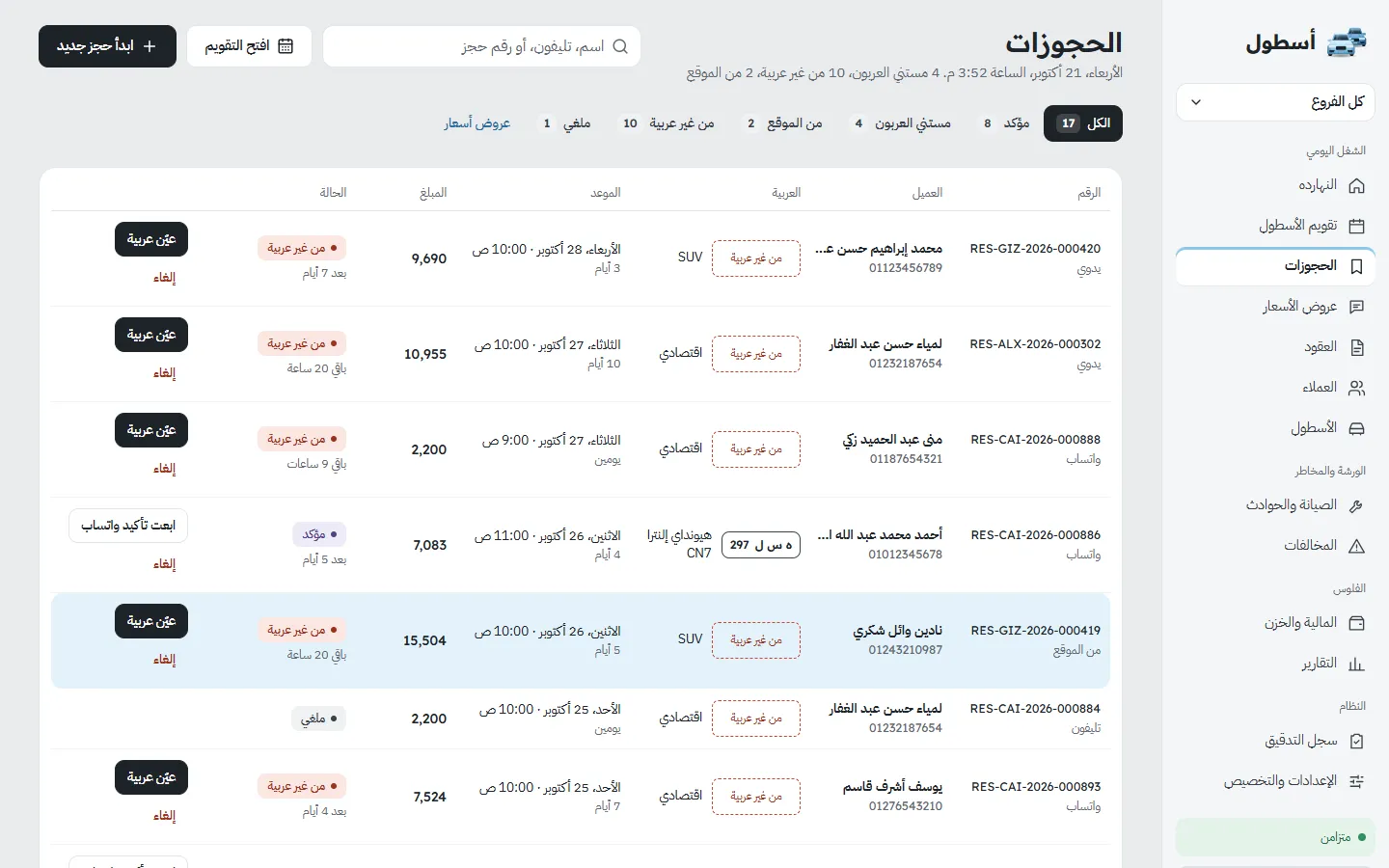
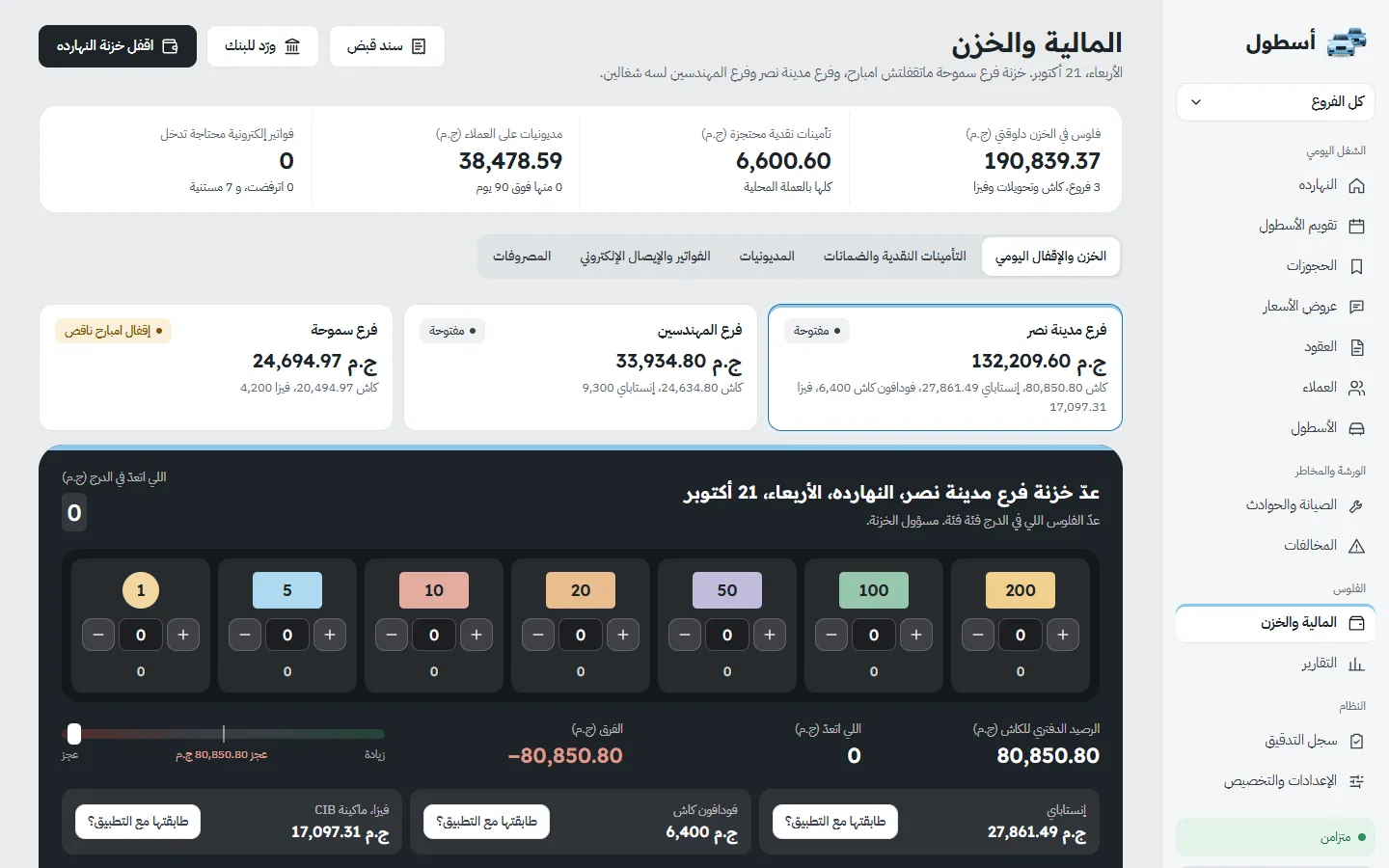
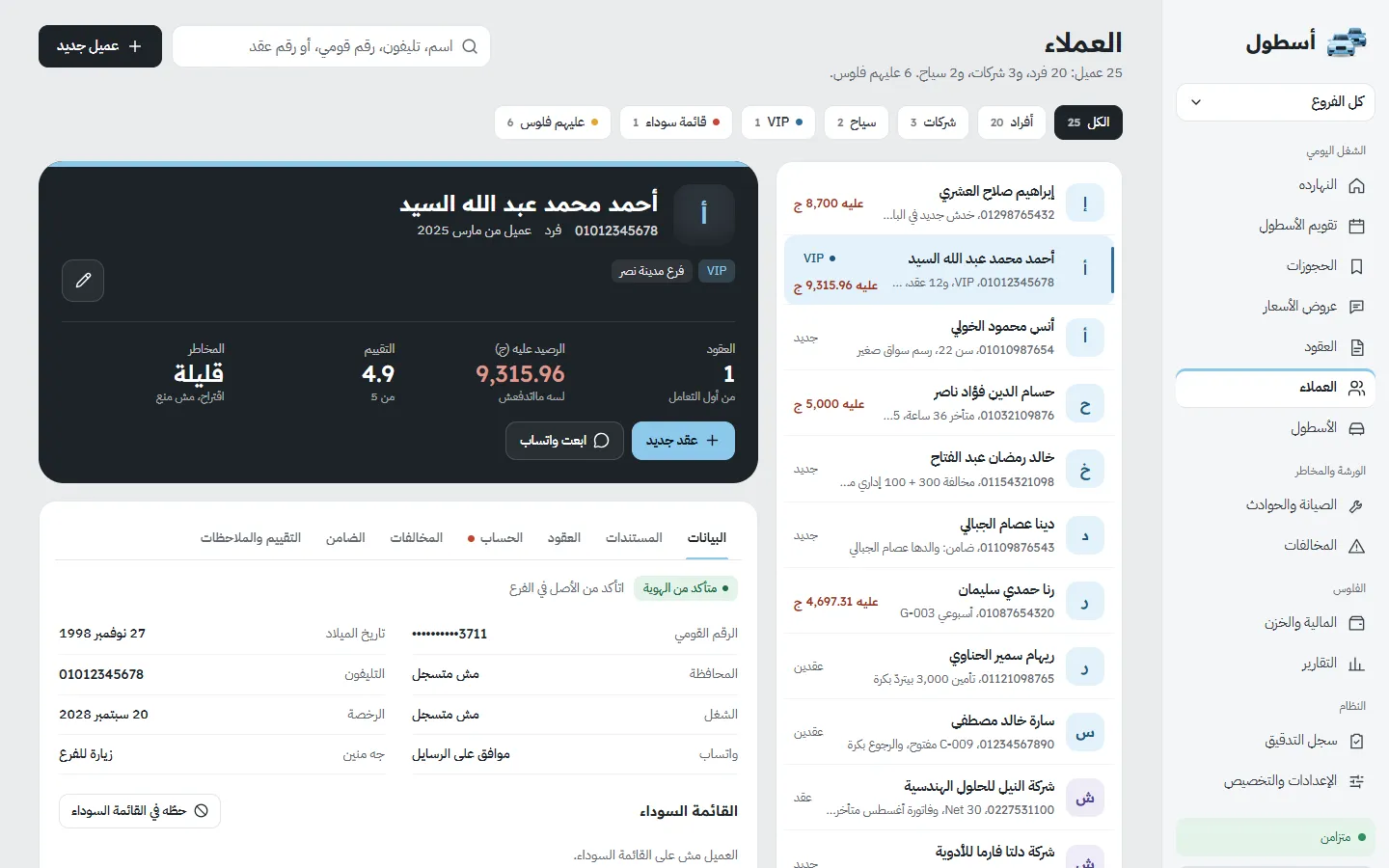
A system that runs a rental office from the quote to the cash count at the end of the day. Every car has a file and a place on the calendar, a booking cannot land on a car that is already out, and a contract does not open before the handover is done on the phone: documents, photos from set angles, odometer, fuel, damage on a diagram, payment and deposit, signature. At return the system compares the two inspections and proposes the late fee, the extra kilometres and the fuel charge, using the rules the office set itself. Deposits are held as the customer's money, fines are matched to the right contract by plate and time, and each office's data is kept completely separate from every other office. The interface is Arabic, right to left, with a full English version, on desktop, tablet and phone.
- 41
- pages in the application
- 12
- ready-made roles for staff
- 144
- settings an office controls, in 24 groups
- 12
- core reports
- Sector
- Car rental (offices and showrooms), Egypt first
- System type
- One product for neighbourhood offices up to multi-branch companies
- Coverage
- Fleet, calendar, reservations, contracts, field handover and return, customers, money, fines, maintenance, reports, settings
- Pages
- 41
- Users
- Owner, managers, agents, accountant, drivers and mechanics, with 12 ready-made roles
- Language and direction
- Arabic by default and fully right to left, with a full English version
- Devices
- Desktop, tablet and phone; handover and return keep working at the counter without internet
- Stage
- Pre-launch, in final testing
The money is lost around the rental, not in it
Renting a car is easy. These are the problems a rental office meets around it when it runs on a paper register, photos on a phone and the owner's memory, and the system was built around them. This section describes working practice, not a measurement of how any one office worked.
Read the detailHide the detail6 points
- The contract and the car
- — The agreement sits in a paper register or a photo on a phone. Nobody can say quickly which cars are out, which are due back today, and which were promised to two people.
- The condition of the car
- — Scratches are argued about after the fact. Without dated photos at handover and at return, the office's word stands against the customer's.
- The guarantee
- — A signed trust receipt, a cheque or a cash deposit is held in a drawer. Giving it back, or using it against damage, depends on someone remembering.
- Fines
- — A traffic fine reaches the office weeks after the car is back, and there is no public feed to look it up. Finding who had the car at that minute is manual work.
- The cash drawer
- — Cash, Vodafone Cash and InstaPay arrive through different doors. At the end of the day the office wants one number that agrees with the drawer.
- The owner's question
- — "Which cars make money?" is answered from memory, because costs are not tied to a car.
Built around how an Egyptian office actually runs
Read the detailHide the detail
We started from the way a rental office in Egypt works, not from a foreign rental template. We looked at the international rental systems and found they share the same core and the same gaps: no real work without internet, no complete Arabic experience with correct Arabic contracts, and nothing built around the trust receipt, the daily till close or the fine that arrives late.
That gave the system three decisions. The office decides its own rules: grace minutes, kilometre allowance, deposit hold days, cancellation fees and approval limits differ from office to office, so they are settings and not fixed. Evidence comes first: a contract does not close without an inspection, and the inspection is the document that settles disputes. And money is never rewritten: a mistake is corrected by a visible reversing entry, never by an overwrite.
We built it screen by screen and checked each one on a desktop and a phone, in Arabic and English, in day and night mode, before moving on.
A rental, from the reservation to the daily close
A rental moves through one enforced sequence. The system itself holds the gates between the steps, so nobody can skip one by accident.
A GOVERNED LOOP7
- 01Reservation
- 02Contract
- 03Handover on the phone
- 04During the rental
- 05Return and charges
- 06Settlement and receipt
- 07Daily close
- Back to 01
Read the detailHide the detail13 points
- 01
Reservation
A quote or a booking is priced from the office's own rules: duration tiers, weekends, extras, protection, discounts, deposit and tax. The price is stored with the booking.
- 02
Contract
The booking becomes a contract with a file, a timeline and its own account. The calendar shows each car as a row and each booking as a bar.
- 03
Handover on the phone
A guided check-out in seven steps: customer documents, odometer, fuel, damage on a diagram with photos from set angles, payment and deposit, then the customer's signature.
- 04
During the rental
An extension or a car swap is recorded on the same contract, and only the change is priced. Fines that arrive later are matched to the contract by plate and time.
- 05
Return and charges
A return in six steps: odometer, fuel, the new inspection set beside the first, then the proposed charges for lateness, extra kilometres and fuel. Staff can waive a charge, but only with a reason.
- 06
Settlement and receipt
The deposit is applied against the charges, the balance still owed is shown before the contract closes, and the invoice and receipt are printed in Arabic.
- 07
Daily close
Each branch counts its cashbox note by note against the books, checks the electronic methods one by one, and closes the day with the difference shown.
A car cannot be booked twice
A car cannot be booked over a period it is already out for. The system refuses the overlap, so no screen and no retry can get around it.
Each office sets its own rules
Grace minutes, the late-hour rate, the kilometre allowance and rate, the fuel charge, the deposit and the cancellation policy are the office's settings, with an Egyptian starting point. A change applies to new contracts only, so a running contract is never re-priced.
No handover before payment and deposit
The handover gate stops the contract if the documents, the inspection, the payment or the deposit are missing. The next-step button stays locked until they are done.
A deposit is the customer's money
It is held as a liability, not counted as income, and is released only after a fines check and within the approver's limit.
Fines find their contract
A fine is matched by plate and time, including when the car was swapped midway through a rental, and what cannot be matched waits in a queue instead of being guessed.
Handover and return work without internet
At the counter the two field flows keep working when the connection drops: the contract is saved on the device, shown with a temporary number, and settled when the connection returns.
The same sequence applies to every agent and every branch, and the owner can see each step afterwards.
The departments
1212departmentsONE PLATFORM
- Fleet
- Calendar
- Reservations and quotes
- Contracts
- Field handover and return
- Customers
- Money
- Fines
- Maintenance
- Reports
- Settings
- Permissions and audit
Read the detailHide the detail12 points
- Fleet
- The plate wall, vehicle files, document expiry dates, odometer and status history, and a bulk import for a whole fleet.
- Calendar
- A timeline with a row per car, a list of what needs solving, and reassignment of a booking from its drawer.
- Reservations and quotes
- A booking wizard with a live price, quote-to-reservation conversion, cancellation fees by timing, and a one-tap WhatsApp message to the customer.
- Contracts
- Check-out, extension, car swap, check-in, settlement and printing, all on one contract file with a timeline.
- Field handover and return
- The seven-step handover and the six-step return on the phone, with photos, a damage diagram, charges and a finger signature.
- Customers
- Profiles with the national ID masked, licence and document dates, a blacklist, guarantors, duplicate merging and the whole history in one place.
- Money
- A cashbox per branch and the daily close, deposits and guarantees, invoices, receivables by age, expenses and receipts.
- Fines
- Manual entry or CSV import, automatic matching, a queue for what is unmatched, and charging a fine to a contract.
- Maintenance
- Work orders that take the car out of availability, breakdowns, incidents and damage claims.
- Reports
- Twelve core reports with CSV export: the day's summary, sales, till movement, open and late contracts and receivables by age.
- Settings
- Company branding, branches, pricing, late fees, deposit and cancellation rules, numbering, payment methods and a go-live import wizard.
- Permissions and audit
- 12 ready-made roles, permissions per action and per branch, invite-only accounts, approvals for waivers and large refunds, and a log of every change with before and after.
Arabic first, and built for the person at the car
The interface is Arabic and runs right to left on every screen, with a full English version. The field screens were designed for a phone held in one hand next to the car, and the app can be installed like any other.
Read the detailHide the detail5 points
- Handover and return are guided, one decision per screen, so staff at the car never have to guess what comes next.
- At the counter both flows keep working without internet: the contract is saved on the device and settled when the connection returns.
- Inspection photos, the damage diagram and the finger signature are all taken on the phone itself.
- The fleet, customers, contracts and the cashbox summary have their own phone layouts, not a shrunken desktop.
- Night mode is part of the design on every screen, and English switches the whole interface to left to right.
Booking wizard on a phone
The screens
43 screensThe system and its screens are real; the data in the screenshots is not. Everything shown was captured from a local build on a throwaway demo office, "الأمين لتأجير السيارات". The office's name, the staff, the customers, the plates, the phone numbers, every amount and every date are invented and belong to no real office, customer or vehicle. The product is pre-launch and has no live customers yet.
Today and availability
Reservations and contracts
Money and printed documents
Fleet
Customers
Fines
Maintenance
Settings
Roles, users and audit
Reports
Night mode
What changes in how an office runs
| How a small office typically runs | With Ostool |
|---|---|
| A paper register or photos on a phone | One contract file with a timeline, printed in Arabic |
| Availability from memory and message threads | A calendar where an overlap is refused by the system |
| Scratches argued about after the fact | Dated photos, a damage diagram, and a handover-to-return comparison |
| A signed trust receipt or cash in a drawer | Recorded, held as the customer's money, released after a fines check |
| Fines found weeks later and matched by hand | Matched by plate and time and charged to the contract |
| Cash, Vodafone Cash and InstaPay counted separately | A cashbox per branch and one daily close |
| Quotes by habit and discounts by mood | The office's rules and approval limits applied to every quote |
| Profit per car is a guess | Costs tied to the car |
| Spreadsheets and chat history as the record | Reports and exports on request |
How a small office typically runs
A paper register or photos on a phone
With Ostool
One contract file with a timeline, printed in Arabic
How a small office typically runs
Availability from memory and message threads
With Ostool
A calendar where an overlap is refused by the system
How a small office typically runs
Scratches argued about after the fact
With Ostool
Dated photos, a damage diagram, and a handover-to-return comparison
How a small office typically runs
A signed trust receipt or cash in a drawer
With Ostool
Recorded, held as the customer's money, released after a fines check
How a small office typically runs
Fines found weeks later and matched by hand
With Ostool
Matched by plate and time and charged to the contract
How a small office typically runs
Cash, Vodafone Cash and InstaPay counted separately
With Ostool
A cashbox per branch and one daily close
How a small office typically runs
Quotes by habit and discounts by mood
With Ostool
The office's rules and approval limits applied to every quote
How a small office typically runs
Profit per car is a guess
With Ostool
Costs tied to the car
How a small office typically runs
Spreadsheets and chat history as the record
With Ostool
Reports and exports on request
This table describes the change in working practice. Ostool is pre-launch and no office has run on it yet, so no operating figures are shown: nothing was measured.