Legal services — litigation and legal consultations · Deployed and running
Galal Osama Law Firm & Legal Consultations
A bilingual public website for a law firm, with an office panel that turns walk-in enquiries and client praise into records the firm can work through and publish itself.
- Client
- Galal Osama Law Firm — The firm's name, logo and published details appear with its agreement.
- System type
- Public marketing site + private office panel
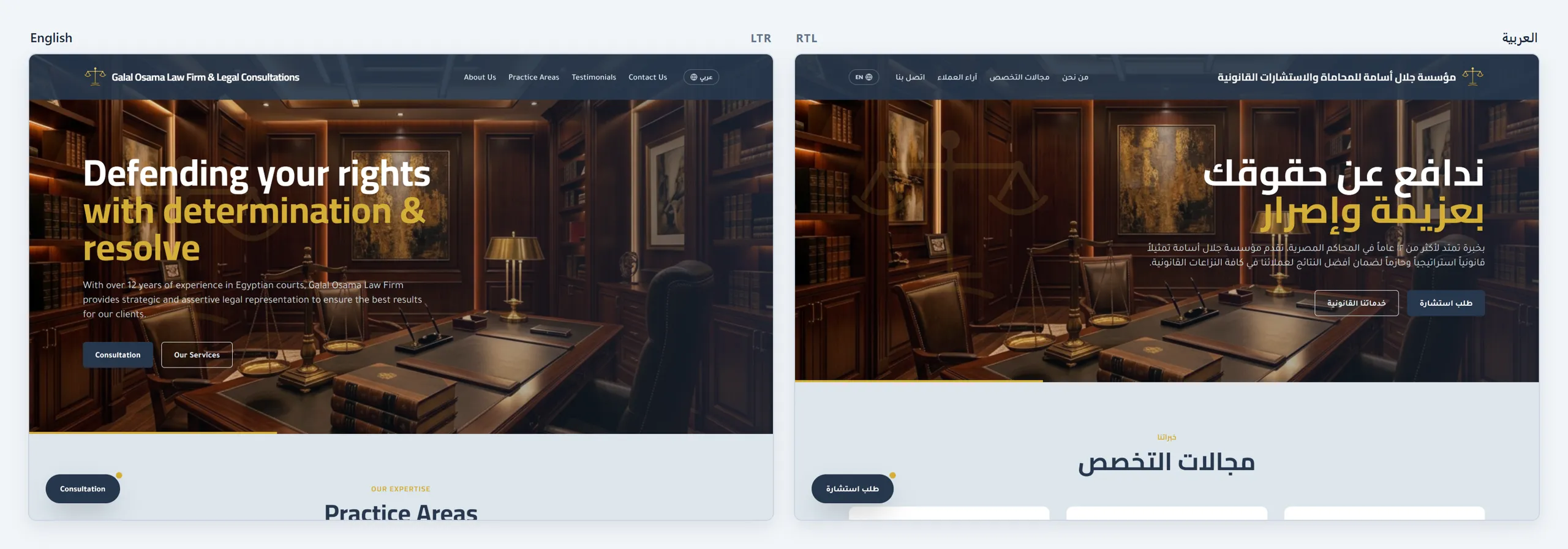
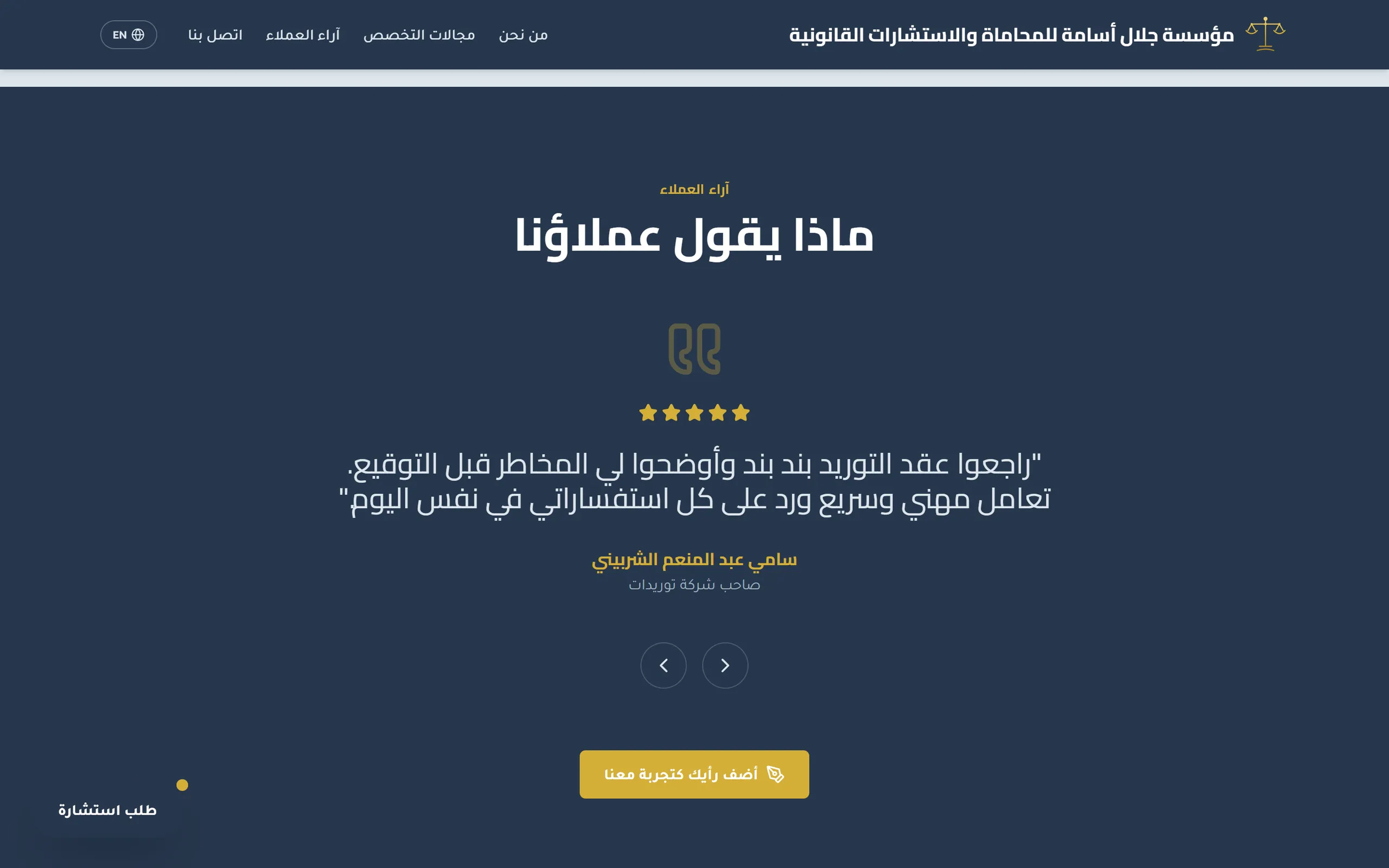
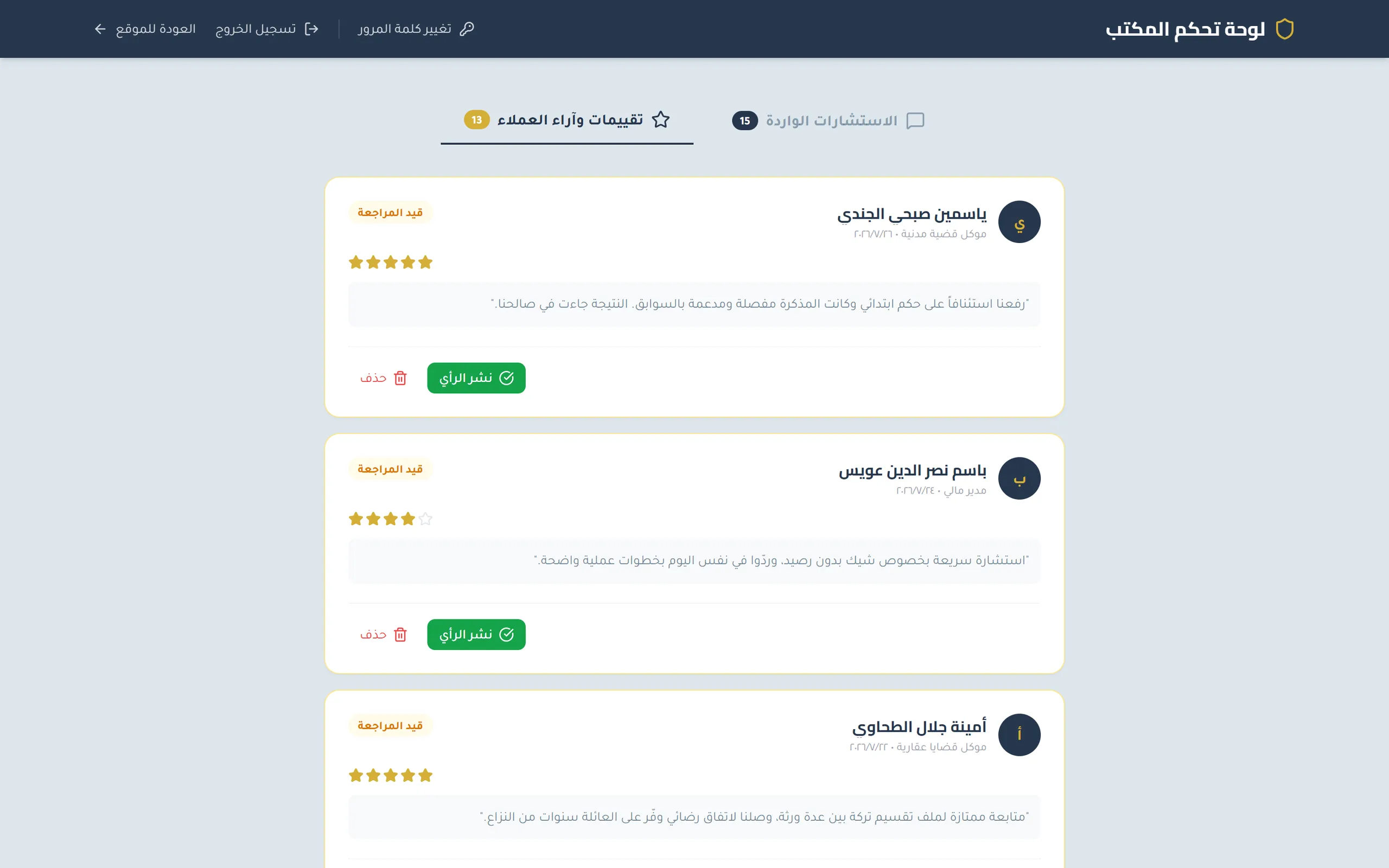
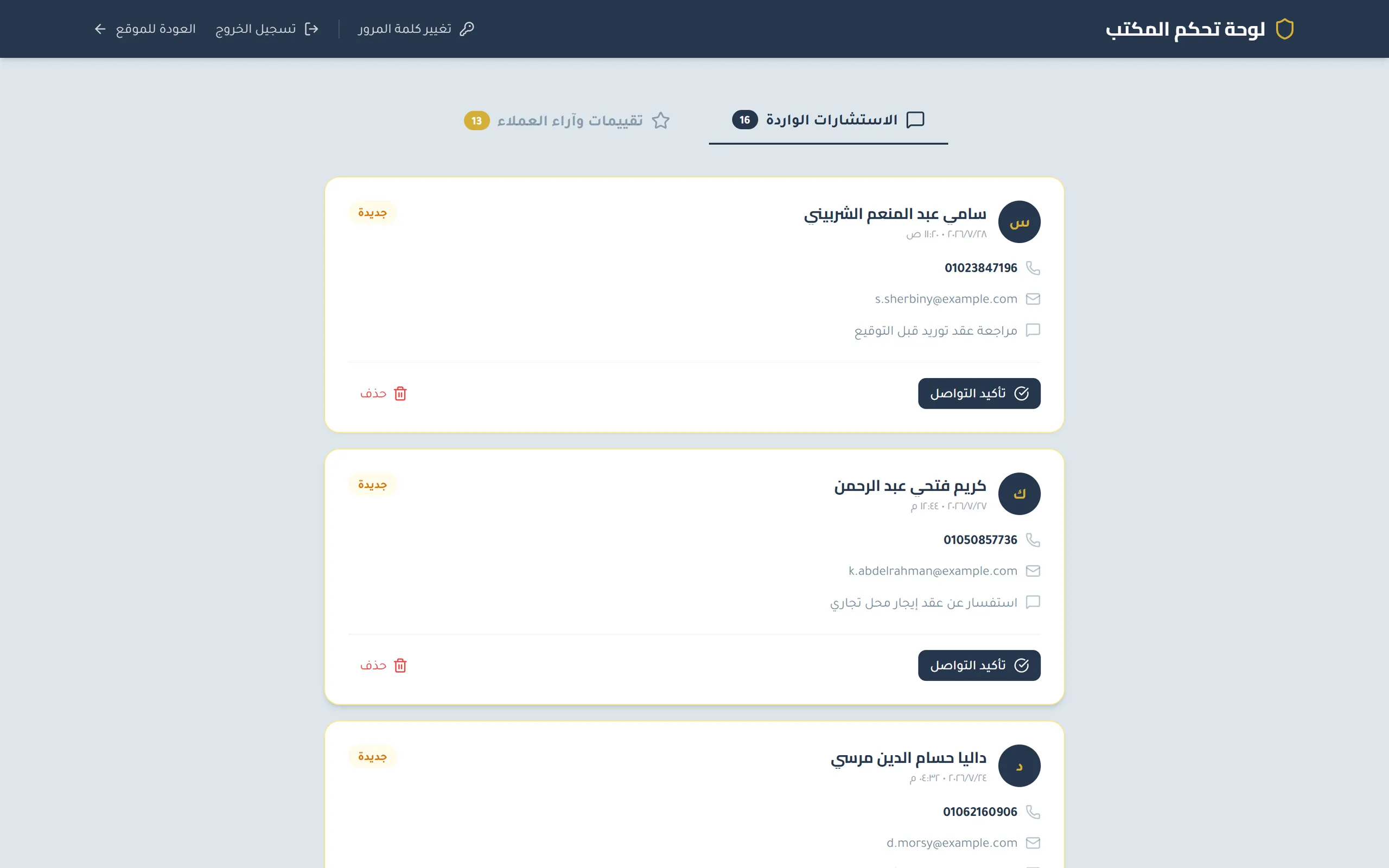
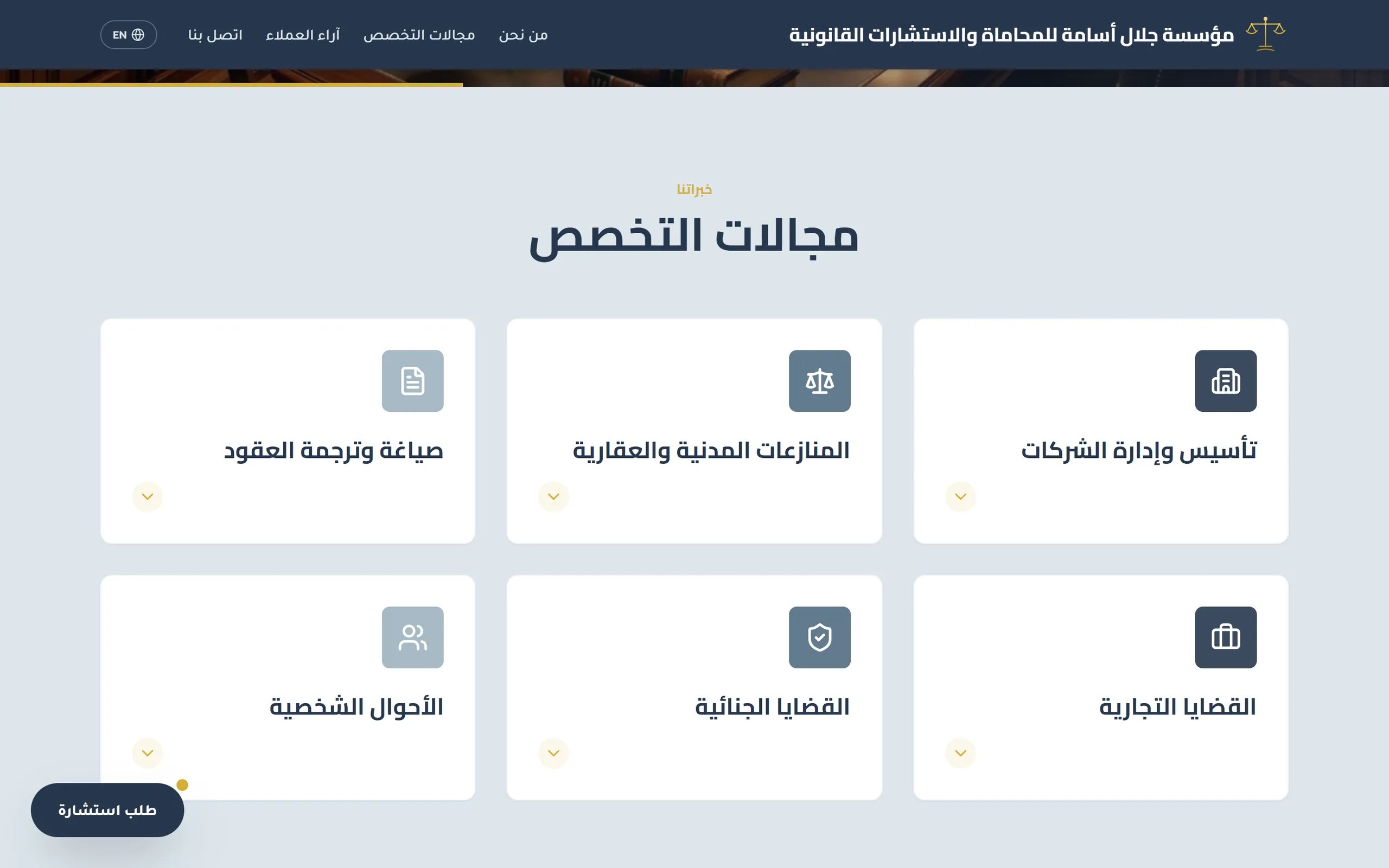
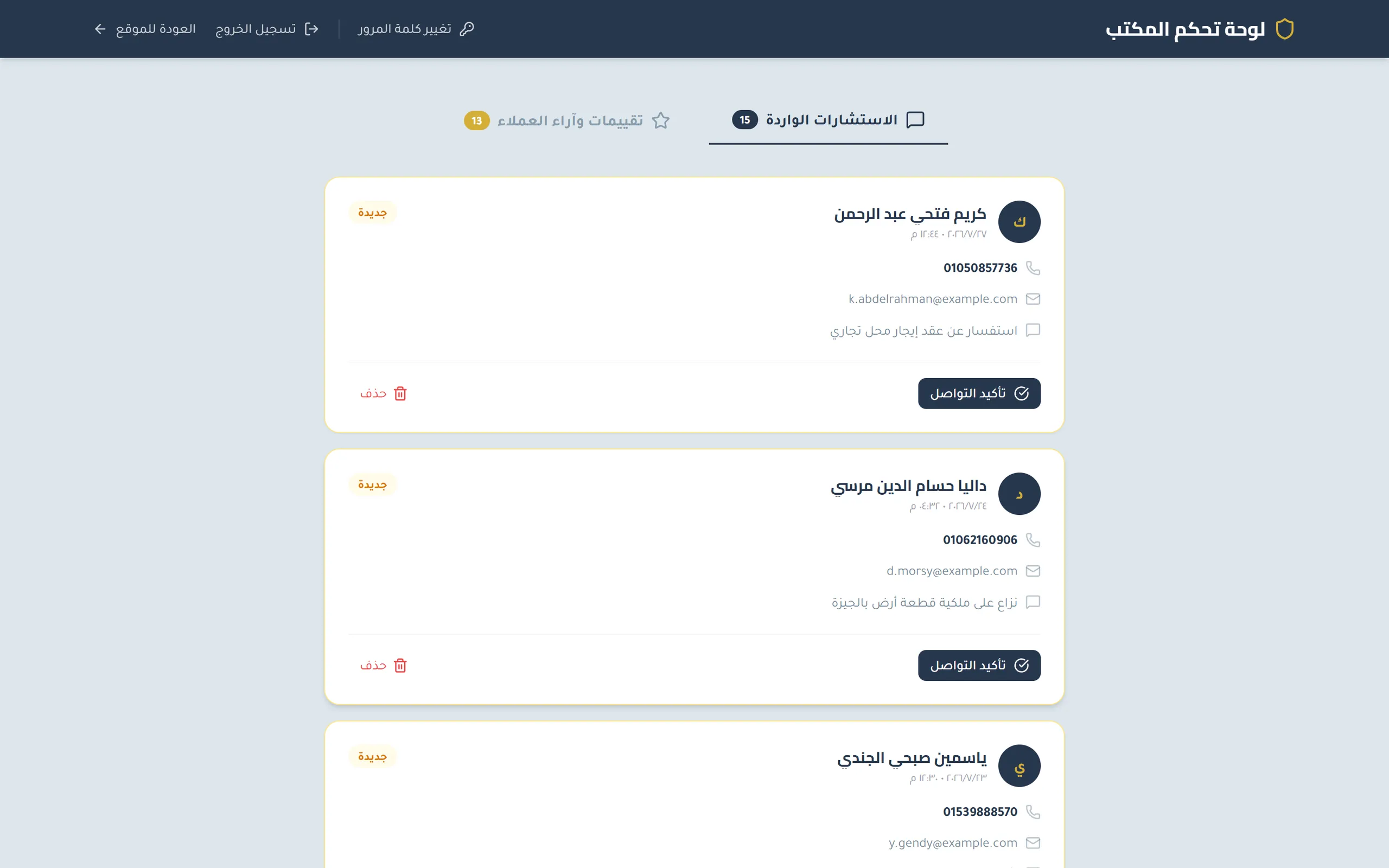
A law firm took every enquiry by phone or WhatsApp: nothing was shared, answered and unanswered looked identical, and client praise never left a private chat. The system replaces that with two chains that run end to end without anyone retyping anything — a capped consultation form that lands in a shared office inbox flagged new, and a review flow that stores a client's words immediately but withholds them until an administrator releases them. One rule holds it together: anyone may submit, only the firm may publish — and it is enforced in the database rules, not the interface. The public site ships a complete second language, 87 translated strings each in Arabic and English, with the layout mirroring rather than translating in place.
- 2,180
- Lines of application code
- 87
- Translated strings per language
- 174
- Translated strings in total
- 6
- Security rule statements
- 50
- Character cap on an enquiry
- 2 / 2
- Languages / text directions
- Sector
- Legal services — litigation and legal consultations
- System type
- Public marketing site + private office panel
- Coverage
- Consultation intake, client-review moderation, publishing
- Users
- The firm's administrators; the public
- Languages
- Arabic and English on the public site (Arabic-only office panel)
- Directions
- Right-to-left and left-to-right
- Devices
- Phone and desktop
The problem before the system
As the firm describes it, everything arrived through a phone call or a WhatsApp message. That created three separate problems, none of which is solved by simply having a website.
Read the detailHide the detail3 points
- Enquiries had no shared record
- — A prospective client would call or message, describe their situation, and the details would live in one person's phone. There was no list anyone else could open, no way to see what had come in that week, and nothing that survived a handset being replaced.
- Nothing distinguished answered from unanswered
- — With enquiries spread across call logs and chat threads, the state of the queue existed only in someone's memory. An enquiry that had been dealt with looked exactly like one that had not.
- Client goodwill stayed private
- — Clients said complimentary things in the same private chats. None of it was visible to anyone deciding whether to instruct the firm, and there was no route from a client's words to the firm's public presence that did not involve someone retyping them.
There was also no English-language presence at all, which matters for a firm whose stated specialisms include corporate formation, commercial negotiation and contract translation — work that brings in clients who do not read Arabic.
The approach
Read the detailHide the detail
We started from how the firm actually receives work rather than from a page layout. Three things shaped every decision that followed.
The first is that enquiries are short. A prospective client does not write a brief; they write two lines saying what the matter is about. Building an open-ended message box would have produced long, unstructured text that nobody reads. We capped the enquiry field instead.
The second is that the firm answers by phone. Whatever the website collects, the next step is a call. So the record the office sees is built around the phone number, and every contact detail on it is actionable rather than merely displayed.
The third is that a law firm cannot publish unvetted statements about itself. Client reviews are valuable and cannot be an open comment box. That single constraint is what turned this from a brochure into a system with a gate in the middle of it.
The system enforces one rule, and that rule is the reason it is a system rather than a set of pages: anyone may submit, only the firm may publish. It applies twice, in two chains that run end to end without anyone retyping anything.
Consultation intake. A visitor completes the form. The record appears in the office inbox immediately, flagged new and outlined so it stands out. When someone has spoken to the client they mark it contacted, and the record's state changes permanently. The enquiry is capped at 50 characters, so what lands in the inbox is a summary the office can scan rather than an essay.
Review moderation. A client writes a review and is told plainly, at the moment of submission, that it will appear after the firm has reviewed it. The review is stored immediately but withheld. It sits in a moderation queue, badged as held, until an administrator releases it. The moment they do, it is live on the public site — no rebuild, no redeploy, no developer.
The withholding is not a convention in the interface that a determined visitor could route around. It is enforced in the database rules: a review may only be created in the unapproved state, and the public may only read reviews that are already approved. The interface and the rules say the same thing, and the rules are the ones that count.
Two languages, two directions
Read the detailHide the detail6 points
- 87 translated strings in each of Arabic and English — 174 in total — covering not only headings and body copy but the parts bilingual sites usually abandon: button labels, form field hints, placeholder examples, success and error messages, and the legal disclaimer under the consultation form.
- Arabic is the default. Switching to English changes the document's language and direction together, and the choice is remembered, so a returning visitor lands where they left off.
- The layout mirrors rather than translating in place: navigation, grids, images, the experience badge and the directional arrows all move to the other side.
- Legal vocabulary is rendered in the terms an English-speaking client would expect rather than transliterated from Arabic, which matters for the commercial clients the firm serves.
- Client submissions are shown in the language they were written in rather than machine-translated, so the English view surfaces a review submitted in English while the Arabic view surfaces an Arabic one. Only the surrounding interface changes language.
- Side-by-side composites show the same screens in both languages at once — English left-to-right, Arabic right-to-left — built by photographing both captures together rather than by editing pixels.
The office panel's interface is Arabic-only. That was the right call for its users and it is stated here rather than glossed over.
English
Arabic
English
Arabic
English
Arabic
On the phone
Every screen was built to work at phone width, and the phone section of this package covers the same ground as the desktop section rather than sampling it — including the consultation request completed end to end on a phone, which is the action the whole site exists to produce.
Read the detailHide the detail7 points
- The six-card practice grid becomes a single column, each card keeping its icon, title and expander at a readable size instead of being scaled down to fit.
- The language toggle sits inside the navigation drawer as a full-width control rather than being dropped on small screens, which is where bilingual sites usually lose their second language.
- Consultation records are cards, not table rows, so nothing scrolls sideways and nothing is truncated — name, status, phone, email and request are all readable at phone width.
- The consultation form is completed end to end at phone width: full-width fields, a numeric keyboard on the phone input, and the same character counter as desktop.
- The review form's stars are sized as tap targets rather than as decoration, and the form scrolls inside its own panel so the page behind it stays put.
- The password-change dialog keeps all three fields, the live strength meter and the reveal toggle. Nothing is dropped to make it fit, which is the usual fate of secondary dialogs on mobile.
- A review can be released from wherever the administrator happens to be — held entries are badged and their publish buttons stay within thumb reach.
Arabic landing on a phone
The screens
36 screensEvery consultation, client name, telephone number, email address and review shown in these screenshots is invented. The images are the real application — its real components, layout, validation and access rules — run against an isolated local dataset; no image was retouched, the production database was never read from or written to, and the build used for capture contains no client library for the hosted database at all. The firm's own name, logo, address, published contact details and legal-awareness material are genuine and appear with the firm's agreement; what was substituted is the client data.
Language pairs
Consultation lifecycle
Review lifecycle
Admin panel and access control
The public site
Impact
| Before | After |
|---|---|
| Enquiries arrived by phone and WhatsApp and lived in one person's handset | Every enquiry is a dated record in a shared inbox |
| Answered and unanswered enquiries looked identical | New and contacted are distinguishable at a glance and recorded in the data |
| Client praise stayed inside private chats | Clients submit reviews themselves, and approved ones appear on the site |
| Publishing anything required the developer | The firm publishes and removes reviews itself, with no deployment |
| Nothing prevented an unvetted statement going public | Nothing reaches the public site until the firm releases it |
| No English-language presence | A full English site with its own dictionary, not a partial translation |
| No structured public presence for search | Sitemap, canonical address and link previews — with the office panel excluded |
Before
Enquiries arrived by phone and WhatsApp and lived in one person's handset
After
Every enquiry is a dated record in a shared inbox
Before
Answered and unanswered enquiries looked identical
After
New and contacted are distinguishable at a glance and recorded in the data
Before
Client praise stayed inside private chats
After
Clients submit reviews themselves, and approved ones appear on the site
Before
Publishing anything required the developer
After
The firm publishes and removes reviews itself, with no deployment
Before
Nothing prevented an unvetted statement going public
After
Nothing reaches the public site until the firm releases it
Before
No English-language presence
After
A full English site with its own dictionary, not a partial translation
Before
No structured public presence for search
After
Sitemap, canonical address and link previews — with the office panel excluded
The firm reports that consultation requests previously arrived only by telephone and WhatsApp. We have not measured how many enquiries or reviews the live system has handled, and this document makes no claim about it.